An AI character generator can turn a text prompt into a fantasy hero, anime original character, game concept, illustrated avatar, or social-media mascot. But a good-looking picture is only part of the decision. When I tested free AI character generator workflows, I wanted to know whether each image actually matched the details I requested, how much effort the interface demanded, and what I could download without paying or retaining a watermark.
The best AI character creator for a one-off avatar may be very different from the right tool for a recurring comic character. Some platforms emphasize character references and revisions, others focus on anime-style generation, and the simplest free options let you experiment without an account. This review covers visual 2D character art—not conversational chatbots or rigged 3D models—and compares both free and paid AI character generators by their practical fit.
I compared six AI character generators for 2D artwork and used one shared fantasy-explorer prompt wherever free or accessible generation was possible. That let me examine first-image accuracy without claiming I had tested the same character across multiple scenes. I also considered how quickly a beginner could start, the pricing and credits needed for a usable image, and whether a watermark made the free export less practical. The result is a practical comparison of AI character maker tools, not a contest judged from promotional galleries.
Key Takeaways
- My feature-based top pick is OpenArt (90/100), closely followed by Leonardo AI (89/100). I would not interpret a one-point gap as a proven difference in image quality.
- PixAI (85/100) has a compelling anime-specific toolkit, while Ideogram (84/100) combines character references with text-based graphic design.
- Midjourney scored 82/100 on documented features, but its subscription requirement prevented an initial free-tier generation in my review.
- Perchance scored 59/100 for advanced features, yet its no-signup access and usable free concept images make it an attractive choice for casual experimentation.
- The feature scores do not measure output accuracy. In my first-generation tests, the main outfit and pose were often recognizable, but small identity details such as the eyebrow scar or precise compass necklace were frequently missed. Pricing, ease of use, and watermark rules also affect which AI character generator is genuinely useful.
How We Evaluated the Best AI Character Generators
I compared six 2D AI character generators using two evidence tracks. First, I assigned a 100-point editorial feature score for documented character controls, repeat-use options, editing, style range, ease of use, pricing/value, and export restrictions. Second, I inspected first-generation results from the same fantasy-explorer prompt wherever I could generate an image. In that hands-on track, I considered how easy it was to start, how accurately the image followed the prompt, what the generation cost, and whether watermark or download restrictions affected the result. The two tracks are presented separately so a strong feature score is never mistaken for a verified image-accuracy score.
Criterion | Max | Scoring basis |
Character creation controls | 20 | Prompt inputs, references, model choices and character-building options |
Documented consistency controls | 20 | Saved identities, reference workflows, training, multi-view and reuse features |
Customization and editing | 15 | Pose controls, inpainting, editor and targeted alterations |
Style versatility | 15 | Available style/model controls for different visual outputs |
Ease of use and onboarding | 10 | Prompt entry, learning curve, setup friction, model and setting clarity |
Pricing and free-plan value | 10 | Credits per output, free access, paid entry price and upgrade restrictions |
Watermarks, exports and rights | 10 | Visible watermark limits, download access, output visibility and licensing clarity |
Total | 100 | Editorial feature score; not a hands-on performance score |
- How I assigned points: The 100-point numbers are editorial feature scores, not laboratory quality scores. Ease of use covers onboarding, prompt entry, settings, and clarity of the interface. Value considers both subscription or credit cost and the practical number of usable images. The export/rights category includes any documented watermark or download restrictions alongside licensing clarity. I give separate first-output observations for prompt accuracy, including clothing, hair, pose, small distinguishing details, and overall style. Where no output was generated, prompt accuracy remains untested—not zero.
- What I did not test: I did not run repeated-character identity consistency, a multi-scene challenge, a repeated-seed benchmark, or standardized lab-grade image-quality scoring. I could generate initial outputs on OpenArt, Leonardo AI, PixAI, and Perchance. Midjourney required a subscription at the entry point, and my Ideogram session did not result in a completed image. Their image accuracy is therefore not rated from firsthand testing.
- Hands-on image-accuracy checklist (descriptive, not scored): I compared the requested auburn hair and green eyes, eyebrow scar, jacket and trouser colors, boots, compass necklace, front-facing full-body pose, clean background, and semi-realistic art direction. I also recorded the number of images returned and visible friction at the export stage. A missed tiny detail is different from a completely wrong character, so I describe both rather than inventing a numerical accuracy rate.
Best AI Character Generators in 2026: Scored Comparison
Tool | Create /20 | Consistency /20 | Edit /15 | Styles /15 | Ease /10 | Value /10 | Rights /10 | Total /100 |
OpenArt | 19 | 20 | 14 | 14 | 8 | 6 | 9 | 90 |
Leonardo AI | 19 | 16 | 15 | 15 | 8 | 8 | 8 | 89 |
PixAI | 18 | 16 | 14 | 14 | 7 | 9 | 7 | 85 |
Ideogram | 17 | 17 | 13 | 13 | 9 | 7 | 8 | 84 |
Midjourney | 19 | 15 | 14 | 15 | 7 | 4 | 8 | 82 |
Perchance | 13 | 4 | 6 | 10 | 10 | 10 | 6 | 59 |
How to read the rankings: Scores measure documented features and workflow usefulness. They do not rank prompt accuracy, image beauty, or character consistency. For firsthand image behavior, compare the prompt-adherence and watermark notes below and the original screenshots in the testing-evidence section.
First-Output Accuracy, Ease of Use, Pricing and Watermarks: What I Observed
Tool | First-image prompt accuracy | Ease / pricing evidence | Watermark or export evidence |
OpenArt | 2 outputs: broad outfit matched; tiny scar unclear | Free account: 40 intro credits; tested setting 20 credits/image | Free export displayed a watermark limitation |
Leonardo AI | 1 output: outfit and pose recognizable; scar absent, compass imprecise | Free daily tokens; several settings/models to learn | Watermark not confirmed by supplied test evidence |
PixAI | 4 variants: main colors and clothing present; scar unclear, compass generic | 3,200 credits for four tested variants; anime-oriented controls | Watermark not confirmed by supplied test evidence |
Ideogram | Not tested: no completed image | Onboarding displayed free-skip route and paid plans | No completed export to assess |
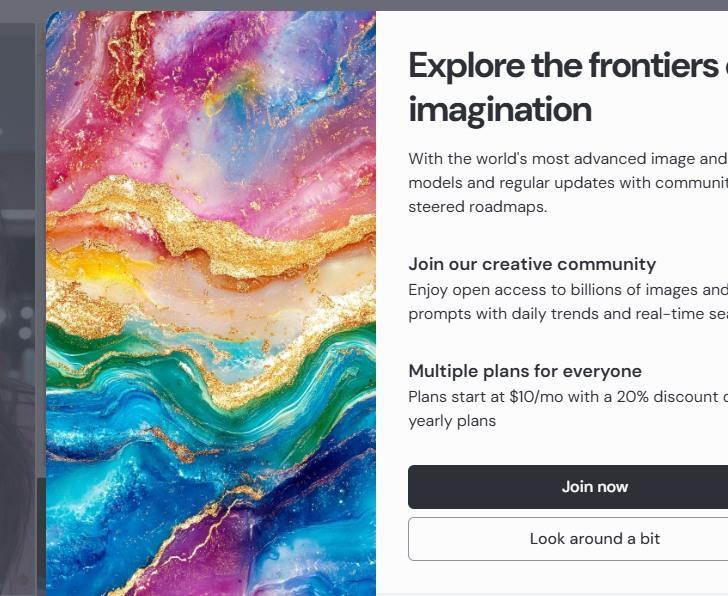
Midjourney | Not tested: subscription gate | Plans advertised from $10/month in tested session | No completed export to assess |
Perchance | 2 outputs: first followed clothing more closely; second drifted | Free, no signup for tested generator | Watermark not established in supplied evidence |
Quick Decision Guide: Best Generator for Your Purpose
I want to… | Best starting point | Feature score | Reason |
Reuse one character in stories and videos | OpenArt | 90/100 | Saved characters, Multi-View, and training workflows |
Create custom fantasy or game concept art | Leonardo AI | 89/100 | Model variety, Image Guidance and selective editing |
Make anime or manga original characters | PixAI | 85/100 | Anime models, LoRAs and advanced controls |
Put recurring characters on posters with text | Ideogram | 84/100 | Character references and typography generation |
Develop artistic and cinematic concepts | Midjourney | 82/100 | Style direction and reference-guided Edit Model |
Generate free characters without signup | Perchance | 59/100 | Straightforward no-credit experimentation |
What I am looking for here is not simply a beautiful first portrait. I want an understandable workflow for making the character useful later. In each review, I separate documented capabilities from the limited images I actually generated.
OpenArt – Best Overall AI Character Generator for Reusable Characters
Among the AI character generators I reviewed, I see OpenArt as the most complete option here for someone trying to build a recurring visual character. The platform offers saved character identities, Multi-View imagery, custom training, and compatible image-to-video workflows. Those capabilities matter because a successful portrait is usually just the starting point of a longer creative project.
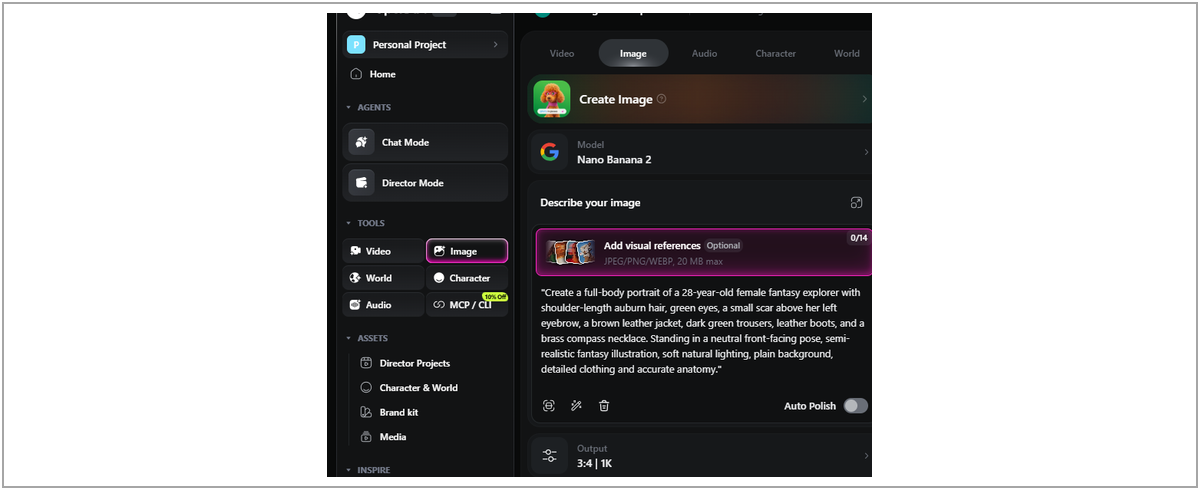
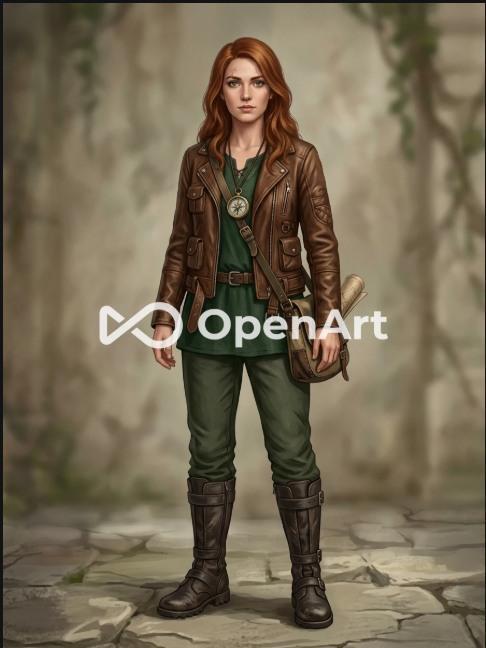
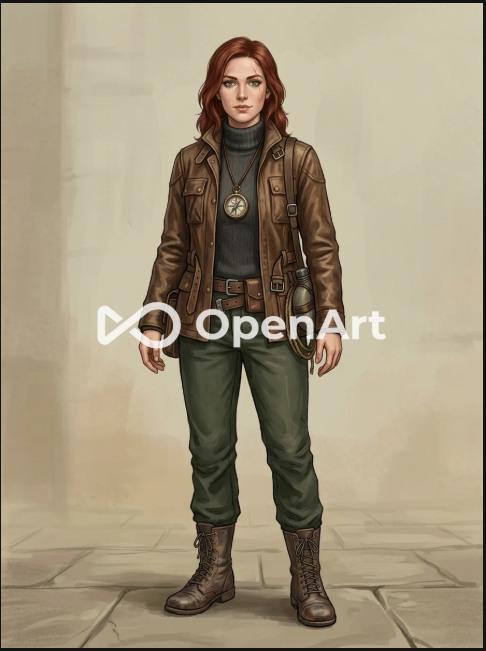
WHAT I ACTUALLY GENERATED , Using the free plan and Nano Banana 2, I obtained two independent full-body portraits from the same fantasy-explorer prompt. Both broadly followed the outfit description, but the eyebrow scar was difficult to confirm, and the interface showed a watermark limitation for free exports. I did not test OpenArt’s dedicated character-consistency system.
Ease of use, image accuracy, price and watermark: The basic prompt-to-image flow was usable, but the credit counter mattered immediately. Both test images broadly respected the fantasy-explorer clothing; neither provided a confidently visible eyebrow scar. I saw a free-export watermark restriction. This is a strong AI character creator for future reusable designs, not necessarily the cheapest way to get one clean illustration.
OpenArt at a Glance
Attribute | Details |
Best for | Overall character creation and consistency |
Editorial feature score | 90/100 (not an output-quality test) |
Notable workflow | Saved-character reuse and Multi-View |
Free/paid access | New accounts receive introductory credits; paid plans available. |
Official site | https://openart.ai/features/ai-character/ |
What Makes It Stand Out
The part I find most valuable is that OpenArt treats a character as something to organize and reuse, not only an image to regenerate. Its documented character-building and Multi-View tools can help a creator establish a visual identity from several angles; separate image and video tools then extend that project. I would still inspect each reference carefully: a multi-view function is useful, but a view containing a changed scar, hairstyle, or accessory is not a reliable master reference.
Key Features
- Saved characters can be tagged in supported creation workflows.
- Multi-View turns a character image into nine camera angles.
- Training can use a library of character reference images.
- Image editing and compatible video workflows support longer projects.
Where It Does Well
- I would pick OpenArt for work where a character returns in many visuals, such as a serial story, recurring mascot, or short-form video series.
- Keeping reference and creation workflows within one platform can reduce the friction of moving between multiple image and video tools.
- Custom character training offers an additional path when ordinary text descriptions are not sufficient, although I have not benchmarked that training feature.
Where It Falls Short
- The saved-character workflow is a feature, not a guarantee. I would still expect to review each output for facial drift and changed accessories.
- The free allowance is a meaningful constraint. In my captured session, the selected model showed 20 credits per generation against a 40-credit introductory balance.
- Advanced models and longer video projects could change the economics quickly; I would estimate the credits per finished scene rather than per first draft.
- Before using OpenArt for paid client work, I would check the exact plan’s privacy, licensing, and export rights instead of relying on a general “commercial use” claim.
Free Plan and Pricing
In the tested AI character generation session, OpenArt presented 40 introductory credits in the tested free account. At the selected Nano Banana 2 cost of 20 credits per image, that allowed two initial generations under those settings. Paid plans add credits and different creative permissions, but I would check the live pricing table for the exact tier, included models, and commercial-use entitlements.
Pricing note: Plans, credits, eligible models, and promotional terms can change. Verify the linked official pricing page before subscribing.
Practical Tips & Things to Watch
- I would decide on three or four non-negotiable identity markers,a scar, hair color, outfit item, or accessory,before creating a master character.
- I would keep only the strongest reference views; a weak or contradictory reference can make a repeatable workflow harder rather than easier.
- I would test short still-image scenes before investing in animation credits, because a convincing portrait does not prove stable motion.
- I would save the approved image, exact prompt, model, and settings together. This is more useful than saving only a finished JPEG.
- For client work, I would check whether generations are public and whether the chosen plan permits the intended commercial use.
Prompt I would start with: “Full-body fantasy explorer with shoulder-length auburn hair, green eyes, a small scar above her left eyebrow, brown leather jacket, dark green trousers, boots, and brass compass necklace. Neutral front-facing pose, soft natural lighting, clean background, semi-realistic illustration.” Keep this character profile unchanged when moving to additional scenes.
My Verdict
My verdict: OpenArt is my best overall feature-based choice for recurring 2D character projects (90/100). I like that its product design supports an entire character workflow, not merely a first portrait. The free-plan screenshots also show the trade-off: usable output, but a watermark and a small introductory credit budget. For a one-off character sketch, I would not pay for these advanced controls.
Score interpretation: My 90/100 measures documented feature availability and usefulness. The two actual images are evidence of first-prompt behavior, not a controlled test of OpenArt’s consistency capabilities.
For each platform I considered two questions separately: what does the official product offer, and what did I observe in the initial image test? That distinction matters most when features such as identity consistency were not directly tested.
Leonardo AI – Best AI Game Character Generator for Creative Control
As an AI game character generator for 2D concept art, Leonardo AI appeals to me when the design is close but needs deliberate refinement. Instead of treating every change as a fresh generation, it offers model selection, image guidance, style references, and editing controls. That combination is relevant to concept artists, game illustrators, and anyone with specific costume or composition requirements. If I were choosing an AI game character generator for 2D concept art, I would put its image guidance and targeted revisions high on my checklist.
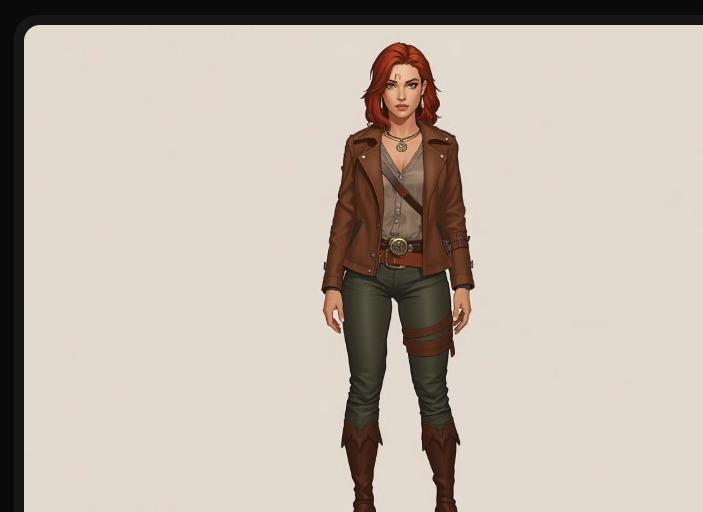
WHAT I ACTUALLY GENERATED , In the free Auto Image workflow with Dynamic styling, I obtained one front-facing full-body explorer. The hair, jacket, dark green trousers and boots were recognizable, while the eyebrow scar was not evident and the compass necklace looked more like a generic pendant. This was an initial generation, not an image-reference test.
Ease of use, image accuracy, price and watermark: I could produce an image using the free Auto Image flow, although models and guidance modes add decisions for new users. The first result matched the main outfit and front-facing pose but missed the scar and simplified the compass. Free daily tokens help with exploration; the supplied capture does not establish a watermark rule, so I would check export conditions for the chosen model and plan.
Leonardo AI at a Glance
Attribute | Details |
Best for | Customization and creative control |
Editorial feature score | 89/100 (not an output-quality test) |
Notable workflow | Reference-guided image creation and editing |
Free/paid access | Free plan with daily tokens; Essential, Premium and Ultimate paid tiers. |
Official site | https://leonardo.ai/ |
What Makes It Stand Out
The distinction between reference types is where I think Leonardo becomes useful. A character reference tells the system whose appearance matters; a style reference tells it how the artwork should look; pose and composition guidance address yet another question. For a designer, that separation can make iteration more intentional. The trade-off is complexity: the right settings depend on the model and the change you want.
Key Features
- Character Reference and Style Reference serve different aims.
- Image Guidance supports composition and pose workflows where available.
- Multiple models and presets support varied concept-art styles.
- Editor and video tools help extend a successful concept.
Where It Does Well
- I find the separate identity, style, and pose controls valuable for revising a character without rewriting every part of the brief.
- Multiple image models make Leonardo flexible for concept-art exploration, though model switching also introduces more variables to track.
- Its free daily tokens make it easier to try the interface before committing to a recurring subscription.
Where It Falls Short
- Character Reference can support likeness, but I would not promise exact consistency without testing that specific workflow.
- Not every image-guidance feature behaves identically across models, making repeatable settings important.
- Some premium guidance options and private-generation controls are unavailable on the basic free tier.
- The token cost of multiple retries, upscaling and video can exceed the cost suggested by a single demonstration image.
Free Plan and Pricing
For free AI character creation, Leonardo advertises a daily free token allowance and several paid tiers with more model access, reference options and private-generation features. The test screenshot showed 134 tokens remaining after generation. I would confirm the exact model cost and current subscription terms before calculating a production budget.
Pricing note: Plans, credits, eligible models, and promotional terms can change. Verify the linked official pricing page before subscribing.
Practical Tips & Things to Watch
- I would pick the guidance mode based on the problem: likeness, art style, and pose are different goals.
- I would increase guidance strength only when needed; extreme settings can reduce flexibility in some workflows.
- I would establish one approved portrait and write down every detail that must remain unchanged.
- If the face is right but the scene is wrong, I would try localized editing before sacrificing the entire result.
- I would check the model actually used, token charge, and public/private generation setting every time.
Prompt I would use with a reference: “Using the attached explorer portrait, create a new forest scene while preserving her auburn hair, eyebrow scar, brown jacket, dark green trousers, boots, and compass necklace. Change the pose and environment, not the character identity. Semi-realistic fantasy illustration.”
My Verdict
My verdict: I rate Leonardo AI 89/100 for documented customization and editing coverage. My initial generation was coherent and closely matched the main costume brief, but the tiny identity markers were weaker. I would recommend it to creators who want to guide revisions deliberately; someone seeking a one-click portrait might find the model and settings choices unnecessary.
Score interpretation: The 89/100 figure reflects feature coverage and workflow fit. It is separate from my single submitted first-generation output.
The next tools demonstrate why a universal ranking can mislead: creative specialization and access can be more important than a headline score for the right project.
PixAI – Best AI Anime Character Generator for Original Characters
For an AI anime character generator, PixAI is the specialist I would investigate first for anime and manga original characters. Its community models, LoRAs, image-editing controls and anime-centered interface give it a different emphasis from broadly photorealistic image platforms. That specialization can be a strength if the final artwork is meant to live in a stylized universe. This is why I treat PixAI as a dedicated AI anime character generator candidate rather than a general-purpose portrait service.
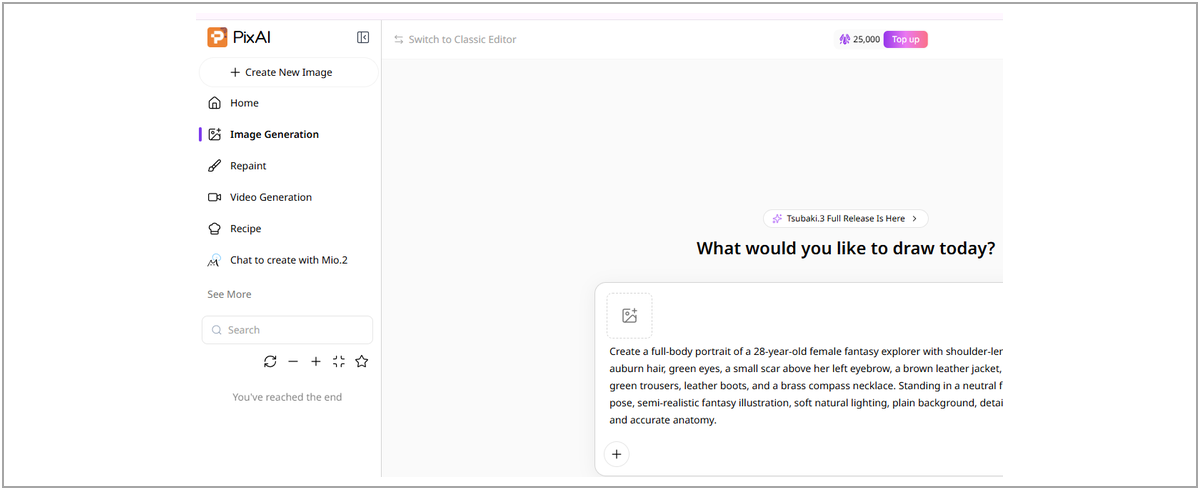
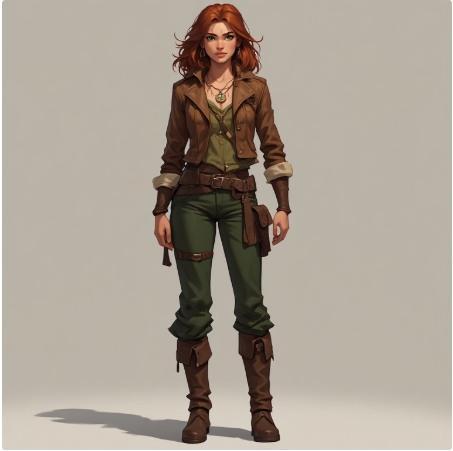
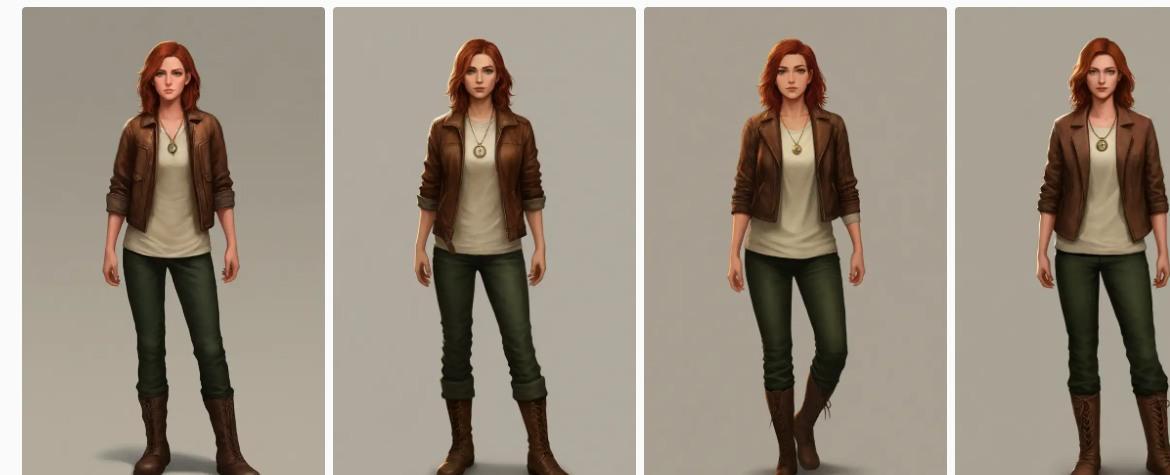
WHAT I ACTUALLY GENERATED , One free Tsubaki.3 Flash request produced four character variations and consumed 3,200 credits in the captured account. The hair, jacket, trousers and boots were consistent with the broad brief; the small scar was not apparent, and the compass mostly appeared as a generic circular pendant. The outputs leaned toward clean contemporary adventurer art rather than a distinctive fantasy treatment.
Ease of use, image accuracy, price and watermark: PixAI produced four anime-leaning variations in one request, which made comparisons easy. The jacket, trousers and boots were broadly right, but the scar was not visible and the necklace was generic. Its model and LoRA ecosystem demands more learning than a basic AI character maker. The capture documents 3,200 credits for the batch, but does not verify a watermark rule.
PixAI at a Glance
Attribute | Details |
Best for | Anime and manga original characters |
Editorial feature score | 85/100 (not an output-quality test) |
Notable workflow | Anime-focused models and custom LoRA workflows |
Free/paid access | Daily claimable credits; paid memberships available. |
Official site | https://pixai.art/ |
What Makes It Stand Out
PixAI combines community-trained aesthetics with controls such as LoRAs, inpainting and pose guidance. I find that attractive for an original character whose style is central to the project. A model, a LoRA, and a prompt all influence the result, though, so I would not casually change all three while trying to reproduce a design.
Key Features
- Large community model and style library for anime and illustration.
- Custom LoRA training for a character or art treatment.
- Image-to-image, seeds, negative prompts and inpainting.
- ControlNet and supported video-related features.
Where It Does Well
- The anime-specific ecosystem is a good match for manga portraits and stylized original characters.
- A broad model library lets creators explore different rendering treatments without having to invent every style in the prompt.
- LoRA and reference workflows offer advanced options for recurring designs, although I did not test trained-character reliability.
Where It Falls Short
- For beginners, model and LoRA choices can make the interface less transparent than a minimal prompt-and-generate tool.
- Some combinations of models, LoRAs and controls are incompatible or produce unexpected results.
- A sizable credit balance does not mean unlimited output; cost depends on model, settings and batch size.
- Community assets require closer attention to provenance and usage rules before commercial work.
Free Plan and Pricing
PixAI offered a free AI anime character generator account, and the recorded generation displayed a 3,200-credit cost for a batch of four images. I would look at cost per usable image rather than treating the headline credit balance as an apples-to-apples comparison with other platforms.
Pricing note: Plans, credits, eligible models, and promotional terms can change. Verify the linked official pricing page before subscribing.
Practical Tips & Things to Watch
- I would choose one anime-compatible model and learn its strengths before changing models repeatedly.
- I would save the full prompt, seed where available, and model version with any character I intend to reuse.
- I would use a compatible character LoRA only when repeated identity becomes important; stacking unrelated LoRAs can complicate results.
- I would prepare clear, varied references before any custom training rather than uploading nearly identical pictures.
- I would reserve higher sampling or upscale settings for the strongest selected draft, not every experimental image.
Example prompt: “Original anime fantasy explorer, 28-year-old woman, shoulder-length auburn hair, green eyes, small scar above left eyebrow, brown leather jacket, dark green trousers, leather boots, brass compass necklace; full body, neutral front-facing pose, clean background.” I would add style-specific tags only after seeing how the chosen model interprets this base description.
My Verdict
My verdict: PixAI earns 85/100 in my feature comparison, and I see its main value in anime-centered character workflows rather than general-purpose photorealism. The four images from my first request were coherent, but fairly similar and less fantasy-specific than I expected. I would choose PixAI for manga-style projects that benefit from model and LoRA control.
Score interpretation: My rating reflects the documented anime creation toolkit. The four actual portraits show initial-prompt behavior, not model-trained character consistency.
After the tools I could generate with, the next two reviews cover useful documented workflows where the accessible testing path did not produce an image.
Ideogram – Best Character Creator for Posters and Typography
For an AI character creator that combines illustration with readable titles, Ideogram is the option I would keep on the shortlist when a character must appear inside a designed asset rather than alone on a blank page. Its dedicated character references and typography features make sense for posters, campaign graphics and visual social content where both artwork and written copy need attention. For someone designing an original character alongside headlines and poster copy, that combination has a practical advantage over a basic image-only character creator.
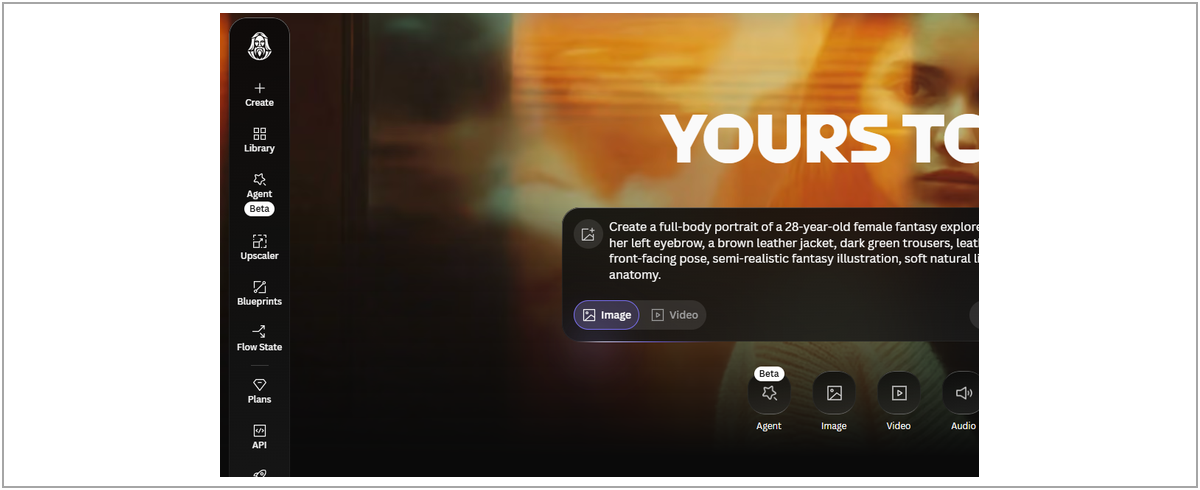
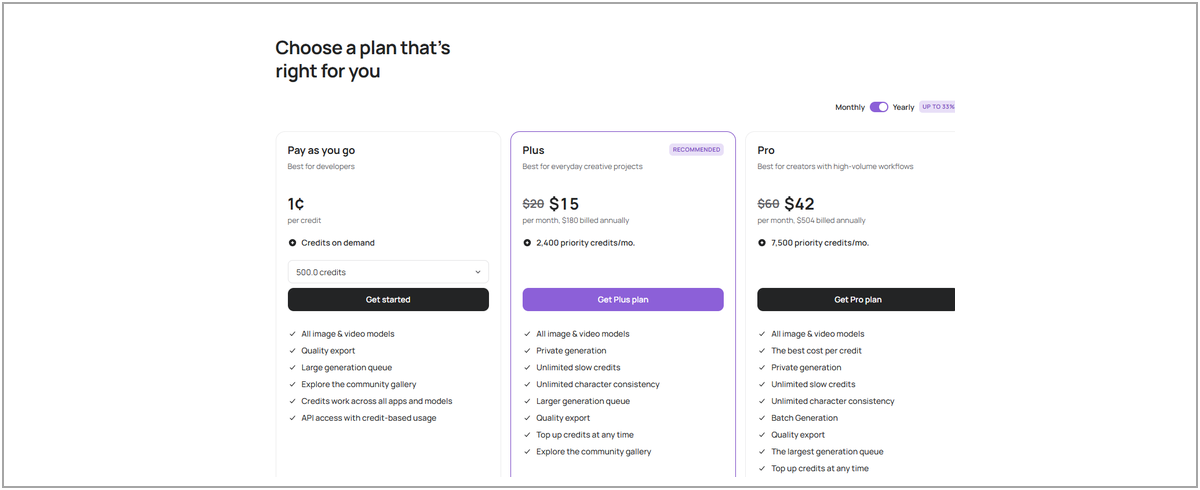
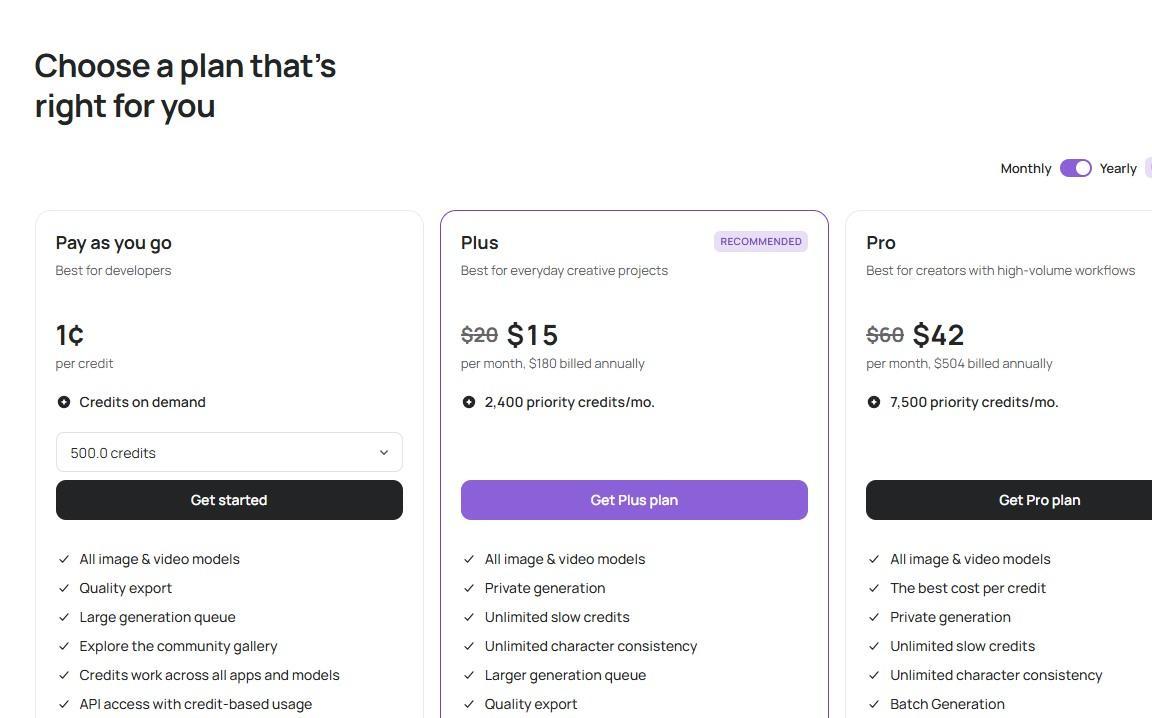
ACCESS NOTE , My captured Ideogram onboarding screen presented Pay as you go, Plus and Pro options and also displayed “Skip for now.” I did not reach a completed free image generation, so I cannot report hands-on prompt adherence or assert that free generation was unavailable.
Ease of use, image accuracy, price and watermark: I encountered plan choices and a “Skip for now” option, but did not finish an image. That means I cannot rate actual prompt adherence or watermark behavior. The captured onboarding showed Plus at $15/month and Pro at $42/month when billed annually; these are session observations, not a live-price guarantee.
Ideogram at a Glance
Attribute | Details |
Best for | Character-based posters and typography |
Editorial feature score | 84/100 (not an output-quality test) |
Notable workflow | Ideogram Character and typography |
Free/paid access | Eligible free accounts receive weekly credits; Plus and Pro paid plans. |
Official site | https://ideogram.ai/features/character/ |
What Makes It Stand Out
What differentiates Ideogram for me is the overlap of identity-reference tools and text-in-image design. For a comic cover or recurring campaign mascot, the character and headline often need to work together. That is not the same need as a character-training pipeline; I would pick Ideogram for a final visual composition and verify the small typography details before publishing.
Key Features
- One-to-five-image character-reference workflow in Ideogram 4.5.
- Poster, logo and text-heavy graphic generation.
- Canvas, remix and selected targeted editing functions.
- Paid private-generation and additional credit access.
Where It Does Well
- I would consider Ideogram when a recurring character has to appear on posters or branded promotional artwork.
- Its combination of references and typography can reduce the need for separate generation and layout stages.
- Multiple character references are useful in principle, but I did not test their consistency performance.
Where It Falls Short
- Its character identity features remain unverified in my hands-on review; a supported reference does not guarantee stable identity.
- Reference usage and paid-plan access can limit the value of a free account for demanding workflows.
- For important copy, I would proofread every letter and punctuation mark in the generated design.
- The onboarding paywall makes access less frictionless than the no-signup Perchance experience I tested.
Free Plan and Pricing
For this AI character creator, my onboarding screenshot showed Plus at $15 per month billed annually and Pro at $42 per month billed annually, alongside a pay-as-you-go offer. Because I did not generate an image, I treat these as observed plan options rather than a measured cost per finished character.
Pricing note: Plans, credits, eligible models, and promotional terms can change. Verify the linked official pricing page before subscribing.
Practical Tips & Things to Watch
- I would begin with an uncluttered, recognizable reference portrait.
- I would supply consistent angles if the active model supports multiple character references.
- I would write the character direction and the exact headline text as separate clauses.
- I would check spelling, punctuation, letters and spacing before sending any poster to a client.
- I would confirm private-generation access before uploading unpublished campaign materials.
Example prompt: “Use the attached original fantasy explorer character as the subject of a vertical promotional poster. Preserve her auburn hair, green eyes, left-eyebrow scar, brown jacket and compass necklace. Mountain backdrop, cinematic illustration. Include the headline EXACTLY: EXPLORE MORE.” I would inspect the headline and face separately.
My Verdict
My verdict: Ideogram scores 84/100 on feature coverage. I like its position between character generation and design-with-text, particularly for posters and campaign artwork. However, my screenshot documents onboarding options, not a completed character image, so I make no claim about its visual quality or actual character consistency.
Score interpretation: Editorial feature rating only; no Ideogram output was generated in the supplied test record.
Midjourney – Best for Artistic Fantasy Character Concepts
For an artistic AI fantasy character generator, I would approach Midjourney primarily as an art-direction tool. Its creative styling, image variations and reference-based editing are relevant when the final character should feel cinematic, painterly or unusually distinctive. That makes it a compelling candidate for fantasy concept art, even though artistic capability and easy character reuse are not identical needs.
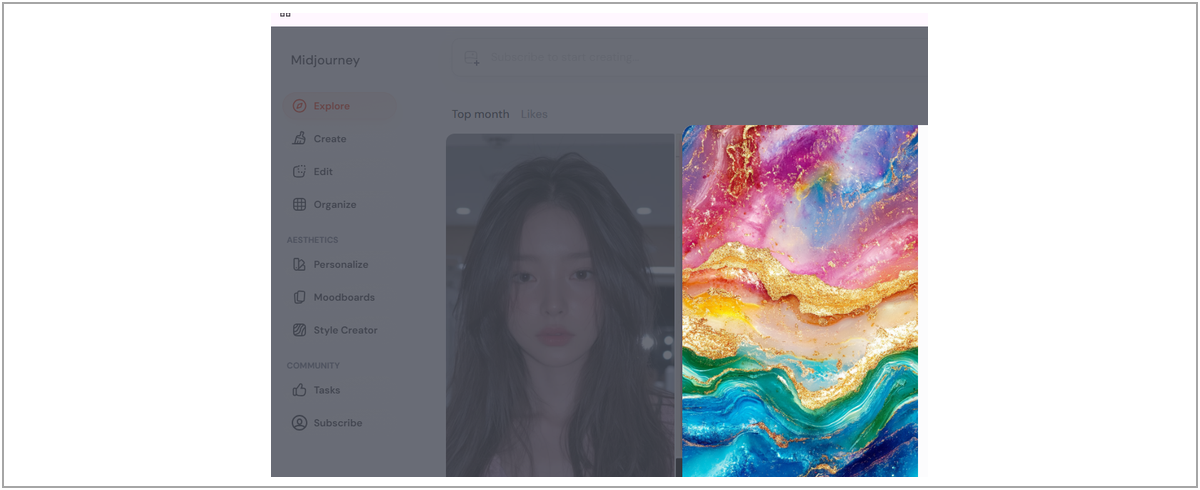
ACCESS NOTE , The Midjourney web interface displayed “Subscribe to start creating,” so I did not produce an image in the tested free/unsubscribed workflow. This review relies on official documentation for its features rather than on personal output-quality claims.
Ease of use, image accuracy, price and watermark: The subscription requirement stopped my unsubscribed first-image test. Its reference and edit controls look useful on paper, but I cannot assess how closely it followed this prompt, how its output downloaded, or whether an export watermark appeared. The captured entry price was $10/month; check current plan terms before treating it as a budget AI character generator.
Midjourney at a Glance
Attribute | Details |
Best for | Artistic and cinematic character concepts |
Editorial feature score | 82/100 (not an output-quality test) |
Notable workflow | Art direction and reference-guided Edit Model |
Free/paid access | Paid subscriptions; Basic, Standard, Pro and Mega tiers. |
Official site | https://www.midjourney.com/ |
What Makes It Stand Out
Midjourney emphasizes creative interpretation and visual treatments. Its current Edit Model workflow also supports reference-guided modifications, but the exact interface depends on model version. I would verify the selected model’s current reference method rather than repeating old “character reference” instructions from earlier tutorials.
Key Features
- Edit Model supports up to four image references in V8.2.
- Style references, moodboards, personalization and Raw prompting.
- Image variations, editor controls and image-to-video options.
- Cinematic and illustrated character-design workflows.
Where It Does Well
- I would shortlist Midjourney for highly stylized concepts where art direction matters more than immediate reuse in a production pipeline.
- Reference and editing tools provide a path for variations after an initial design is approved.
- Image-to-video options are relevant if the deliverable includes short cinematic motion rather than only still artwork.
Where It Falls Short
- The subscription gate prevented me from checking whether the output matched our detailed fantasy-explorer prompt.
- Its reference workflow is not identical to a dedicated trained-character library.
- The number of images, edits, and video clips can affect total GPU-time usage.
- Privacy-sensitive teams should understand the public-generation model and available paid privacy controls.
Free Plan and Pricing
For paid AI fantasy character generation, the sign-up screen I reached advertised plans beginning at $10 per month. I would review the official tier table for GPU time, relaxed generation, video allowances and privacy features before subscribing, rather than judging value from the entry price alone.
Pricing note: Plans, credits, eligible models, and promotional terms can change. Verify the linked official pricing page before subscribing.
Practical Tips & Things to Watch
- I would state core identity traits before describing the cinematic lighting or background.
- I would use the current Edit Model’s reference controls rather than relying on older model-specific syntax.
- I would change background and pose separately when identity details are important.
- I would inspect character-specific details,scar placement, eye color, clothing, accessories,in every candidate.
- I would confirm commercial-use, privacy and plan limits before publishing confidential or client artwork.
Example prompt: “Full-body fantasy explorer with auburn shoulder-length hair, green eyes, eyebrow scar, brown leather jacket, dark green trousers, boots, and brass compass necklace; front-facing neutral pose, semi-realistic fantasy artwork, gentle natural light, simple background.” For a reference-guided edit, I would attach the approved character image in the current editor.
My Verdict
My verdict: I assign Midjourney 82/100 for its documented artistic and editing feature set, with access/value pulling down the overall feature score. I would consider it for visually ambitious fantasy concepts, but I cannot compare its actual rendered output to the free tools here because generation required a subscription.
Score interpretation: Documented feature coverage only. This review includes no firsthand image output from Midjourney. Free access deserves its own verdict. A tool can be modest on advanced features and still do exactly what a beginner needs.
Perchance – Best Free AI Character Generator Without Signup
As a free AI character generator without signup, Perchance is the tool I would recommend when the goal is to explore character ideas quickly and without account setup. I find its stripped-down experience useful: type a description, choose a style, and examine the results. It does not compete with advanced character-management systems on features, but a casual creator may not need those systems at all. The Perchance AI character generator also addresses the most important expectation behind a free AI character generator: being able to try an idea immediately.
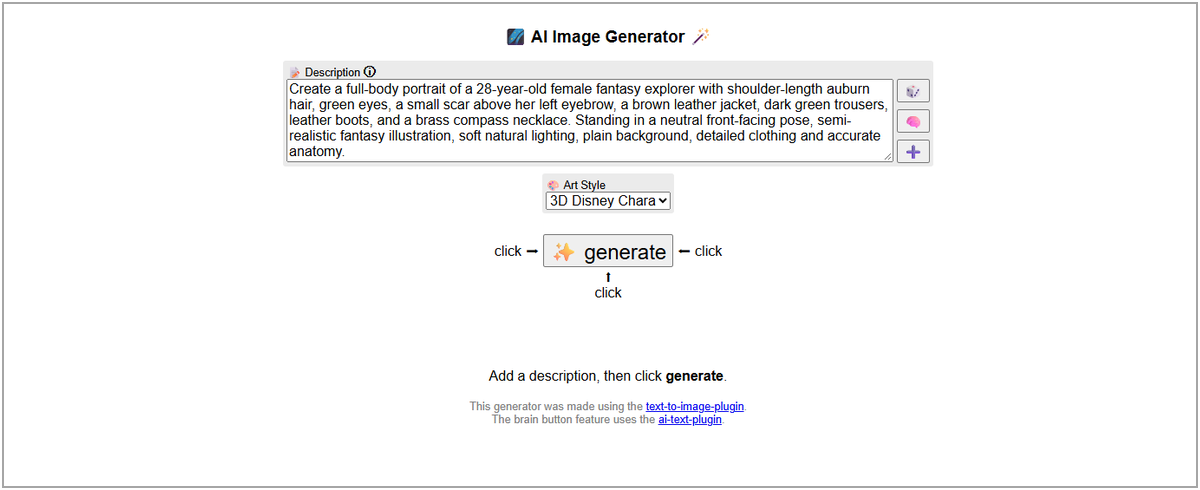
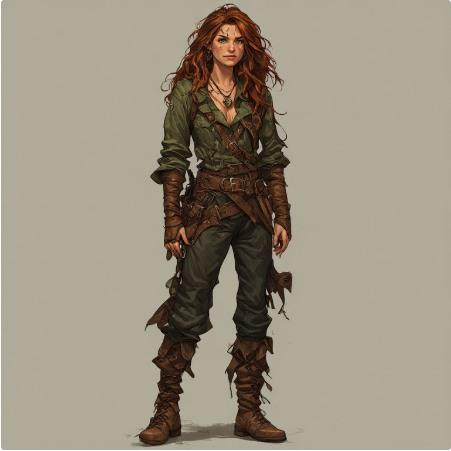
WHAT I ACTUALLY GENERATED , Using the no-signup Perchance image generator with Digital Painting selected, I obtained two full-body character illustrations. The first followed the requested jacket, trousers and neutral pose more closely; the second favored a rugged fantasy look and departed further from the brown-jacket instruction. The scar and precise compass design were unclear in both.
Ease of use, image accuracy, price and watermark: This was the simplest free AI character generator to begin using—no signup or credit purchase was required in the tested workflow. The first illustration followed the brown jacket and green trousers more closely; the second wandered from the outfit brief. The scar and compass details remained unclear. I did not capture conclusive watermark evidence, so I do not claim watermark-free exports.
Perchance at a Glance
Attribute | Details |
Best for | Free character brainstorming without signup |
Editorial feature score | 59/100 (not an output-quality test) |
Notable workflow | Free, no-signup text-to-image concepts |
Free/paid access | Free access; no paid plan required for the reviewed generator. |
Official site | https://perchance.org/ai-text-to-image-generator |
What Makes It Stand Out
Perchance removes friction from the earliest stage of character design. I could use a detailed prompt without creating an account, and the results offered two distinct directions to compare. That is meaningful value when I am still deciding what the character should look like, rather than trying to maintain a production-ready identity over dozens of scenes.
Key Features
- Prompt-driven character generation and style options.
- No-signup entry on the commonly used free generator.
- Negative prompt and composition controls where available.
- Download outputs to continue editing in other tools.
Where It Does Well
- The no-signup workflow makes spontaneous experimentation easy.
- The first character output adhered closely to the larger color and clothing instructions.
- Different visual directions can be produced without a subscription barrier.
Where It Falls Short
- I did not find a comparable dedicated character-training workflow in the tested generator.
- Small identity details, especially the eyebrow scar and compass shape, were not reliably visible in my sample.
- It lacks the deeper reference and selective-editing suite of dedicated paid character systems.
- I would not choose it for a large comic series unless I had another way to manage and correct character references.
Free Plan and Pricing
The free AI character maker I used allowed free, no-signup creation without displaying a credit purchase requirement. I would still check the platform’s terms and the exact generator being used; similarly named Perchance services are not automatically the same product.
Pricing note: Plans, credits, eligible models, and promotional terms can change. Verify the linked official pricing page before subscribing.
Practical Tips & Things to Watch
- I would put permanent traits in a stable, reusable character description rather than improvising them in every prompt.
- I would select the closest available art style,Digital Painting suited our semi-realistic fantasy brief better than the default 3D cartoon style.
- I would compare multiple first outputs before selecting a final design; the second of my samples looked richer but followed the clothes less precisely.
- I would save both the prompt and the images immediately instead of assuming the generator will preserve a character session.
- I would use a tool with reference editing if the chosen portrait must later reappear across many scenes.
Example prompt: “Female fantasy explorer, auburn shoulder-length hair, green eyes, small scar above left eyebrow, brown leather jacket, dark green trousers, boots, brass compass necklace, full-body front-facing neutral pose, plain background, digital painting.” I would use negative prompts only if the current generator supports them.
My Verdict
My verdict: At 59/100, Perchance sits lower in my feature ranking because it lacks many specialist controls. That does not make it a bad free character generator. I got two usable concept directions without signing up or paying, and that is exactly the experience I would prioritize for a quick avatar or first creative sketch.
Score interpretation: Documented feature coverage is limited. The two original outputs illustrate initial prompt interpretation, not recurring-character consistency.
After spending time comparing these platforms, I would make the decision in the following order rather than starting with a brand name or a numeric score.
How to Choose the Right AI Character Generator
- I would decide first what the final asset must be: a single portrait, comic illustration, poster, or repeated video character. This filters out tools with impressive features I will never use.
- I would look for saved identity and reference workflows only when a character needs to recur. I would not assume that repeating the same prompt maintains the same face. For a consistent character AI workflow, I would verify reference controls first and never confuse their availability with proven identity fidelity.
- I would prioritize local editing controls if I expect revisions; otherwise, repeated whole-image generations can waste effort and change details that were already correct.
- I would calculate cost per usable final image, not just advertised credits or the entry subscription price.
- I would inspect visibility, plan rights, and third-party intellectual-property concerns before using a character in client or commercial media.
- Most importantly, I would judge the complete workflow,how easily I can preserve, change, reuse, and export the character,rather than just the prettiest image in a product gallery.
I did not run the repeated-character experiment during this review, but these are the practical steps I would follow if I were building a character for a longer personal or client project.
How to Create Consistent AI Characters: Step by Step
Step 1: Create a Character Profile
Element | Example |
Identity | Fantasy explorer, late 20s |
Face | Oval face, green eyes, scar above left eyebrow |
Hair | Shoulder-length auburn hair |
Clothing | Brown leather jacket, dark-green trousers, boots |
Accessory | Brass compass necklace |
Visual style | Semi-realistic fantasy illustration |
In my own character briefs, I separate details that define identity (face shape, eye color, scar, hairstyle, signature clothes) from elements I expect to change (pose, scene, lighting). That makes prompts easier to troubleshoot and references easier to evaluate.
Step 2: Make a Clean Base Portrait
The first portrait should be an uncomplicated reference: full body, front-facing, unobstructed outfit, simple background. In my test I used a 28-year-old auburn-haired fantasy explorer with a brown jacket, green trousers and compass necklace. The ideal starting image is not necessarily the most dramatic one; it is the one with the clearest recognizable features.
Step 3: Save the Reference and Settings
If I plan to reuse the character, I save the exact prompt, model, seed if available, aspect ratio and final image. For platforms with character-saving or training controls, I add the approved portrait to the appropriate identity workflow. This is advice for future production, not a consistency experiment I ran during this review.
Step 4: Change Only One Major Variable
I would use a prompt such as: “Using this approved character reference, show the same explorer beside a campfire; preserve face, hair, eyebrow scar, jacket and necklace; change only pose, scene and lighting.” When evaluating the result, I would distinguish whether a failure comes from the reference image, the chosen model or the editing instruction.
Step 5: Compare and Correct
- Face: eye shape, scars, proportions, hairline and other identifying traits.
- Outfit: colors, insignia, accessories and fabric patterns.
- Body: anatomy, hand count, proportions and intended pose.
- Style: illustration treatment, linework and lighting consistency.
I prefer targeted editing when only one detail is wrong. A changed necklace or missing scar should not require rebuilding the whole image if the editor can isolate the affected region.
Step 6: Build a Reusable Character Sheet
For recurring projects, I would keep a compact approved character sheet: close-up face, front and side views, outfit notes and reference settings. I would also identify which views are verified rather than treating every generated variation as equally trustworthy.
Common Mistakes to Avoid
Mistake | Better approach |
Vague character prompts | Define stable, distinguishing traits. |
Rewriting identity from scratch | Reuse an approved reference and stable description. |
Changing pose, outfit and style simultaneously | Modify one major dimension at a time. |
Assuming reference equals perfect consistency | Audit every image and edit visible drift. |
Ignoring commercial or privacy rules | Check applicable provider and model terms before publishing. |
Best AI Character Generators by Use Case
Need | Best starting point | Score |
Recurring comics and story characters | OpenArt | 90/100 |
Custom fantasy/game illustrations | Leonardo AI | 89/100 |
Anime originals and manga | PixAI | 85/100 |
Character posters, branding and text | Ideogram | 84/100 |
Cinematic, stylized art direction | Midjourney | 82/100 |
Free sketches without an account | Perchance | 59/100 |
I would use this section as a shortcut, not a universal ranking. A creator making an occasional avatar can reasonably choose Perchance over a higher-scoring subscription tool. Someone requiring a reusable anime original character may find PixAI more suitable than a platform with broader but less focused tools. I would not assume that a tool marketed as an AI game character generator can export usable 3D meshes: this article evaluates 2D visual-character creation.
I found that free access is not a simple yes/no column. The number of images, watermarks, model choices, and export restrictions determine whether the free plan is actually useful.
Free vs Paid AI Character Generators: What You Actually Get
Feature | Free entry | Paid access |
Basic character creation | Often available, sometimes with credits | More model and generation capacity |
Consistent-character workflow | Often limited or metered | More references, training or saved identities |
Editing and export | Depends on provider | Often broader export/editing options |
Private generation | Frequently restricted | Available on selected plans |
Commercial use | Provider- and tool-dependent | Still depends on terms, not automatically unrestricted |
Watermarks and clean exports | May carry watermarks or restrictions; varies by model and tool | Often fewer export restrictions, but verify each plan and model |
In my hands-on comparison of free vs paid AI character generators, I found that “free” can mean very different things. OpenArt showed limited introductory credits and a watermark restriction; Leonardo provided daily tokens; PixAI used credits for a four-image batch; Perchance produced concept art without signup. I would check download quality, watermark rules, privacy settings and cost per usable final image before upgrading. A paid AI character creator makes the most sense when specific editing or export limitations block the project—not simply because it has more features.
For monetized or client work, I check the provider’s current rights and privacy terms rather than equating “paid” with unrestricted ownership. Commercial-use permission is not the same thing as a copyright guarantee, and it does not erase rights attached to uploaded photographs or existing protected characters.
Final Verdict
My final take: If I were choosing one platform for a longer recurring 2D character project, I would start by examining OpenArt’s workflow (90/100 feature score). For more deliberate illustration edits I would compare Leonardo AI (89/100), and for anime originals I would shortlist PixAI (85/100). If I simply wanted a free character concept today, I would choose Perchance despite its lower specialist-feature score. Ideogram remains an interesting design-and-type option, while Midjourney is a paid artistic alternative I could not generate with during this free-access review.
The scores are editorial feature ratings, not an image-accuracy leaderboard. From my initial generation tests, broad clothing and composition instructions were easier to satisfy than tiny identity markers. I would select an AI character generator by first-output accuracy, ease of use, total pricing, and watermark/export conditions alongside its documented character tools. Ideogram and Midjourney remain untested for actual output in my evidence, and I did not conduct a multi-scene consistency benchmark.
Editorial Scoring Appendix: Full Breakdown
Tool | Create | Consistency | Editing | Styles | Ease | Value | Export/rights | Total |
OpenArt | 19 | 20 | 14 | 14 | 8 | 6 | 9 | 90 |
Leonardo AI | 19 | 16 | 15 | 15 | 8 | 8 | 8 | 89 |
PixAI | 18 | 16 | 14 | 14 | 7 | 9 | 7 | 85 |
Ideogram | 17 | 17 | 13 | 13 | 9 | 7 | 8 | 84 |
Midjourney | 19 | 15 | 14 | 15 | 7 | 4 | 8 | 82 |
Perchance | 13 | 4 | 6 | 10 | 10 | 10 | 6 | 59 |
The retained editorial feature-score weights are 20 / 20 / 15 / 15 / 10 / 10 / 10 for creation, documented consistency features, editing, styles, ease of use, pricing/value, and watermark/export/rights considerations. These totals reflect documented workflow coverage, not measured prompt accuracy. The first-output findings appear in the separate observational comparison and original image-evidence gallery. A different editorial rubric could change the order.
Official Product Sources (Checked November 2026)
OpenArt Character: https://openart.ai/features/ai-character/
OpenArt Plans: https://openart.ai/suite/pricing
Midjourney Edit Model: https://docs.midjourney.com/hc/en-us/articles/48495453462797-Edit-Model
Midjourney Plans: https://docs.midjourney.com/hc/en-us/articles/27870484040333-Comparing-Midjourney-Plans
Leonardo Plans: https://leonardo.ai/pricing/
Ideogram Character: https://ideogram.ai/features/character/
Ideogram Plans: https://ideogram.ai/pricing/
PixAI Credits: https://wiki.pixai.art/en/w/Credits
Perchance Terms: https://perchance.org/terms-of-service
Perchance Image Generator: https://perchance.org/ai-text-to-image-generator
Hands-On Testing Evidence: Same Prompt, Original Outputs
I used a single shared 2D character brief across the accessible image-generation workflows and inspected the screenshots supplied from those sessions. I placed the original evidence here so readers can see the actual image results after reading the recommendations. This section documents initial image generation only; I did not use these images to claim tested character consistency.
MASTER PROMPT , Create a full-body portrait of a 28-year-old female fantasy explorer with shoulder-length auburn hair, green eyes, a small scar above her left eyebrow, a brown leather jacket, dark green trousers, leather boots, and a brass compass necklace. Standing in a neutral front-facing pose, semi-realistic fantasy illustration, soft natural lighting, plain background, detailed clothing and accurate anatomy.
Tool | Observed access / configuration | Original outputs | Finding |
OpenArt | Free plan; Nano Banana 2; 3:4; 1K; 20 credits/image | 2 | Strong broad prompt compliance; scar unclear; export/share watermark notice |
Leonardo AI | Free; Auto Image; Dynamic; selected custom dimensions | 1 | Strong silhouette/clothing; scar missing, compass simplified |
Perchance | No signup; Digital Painting chosen | 2 | First more faithful; second changed clothing/hair; scar unclear |
PixAI | Free; Tsubaki.3 Flash; 3,200 credits/batch | 4 | Consistent broad outfit details; scar unclear; generic pendant |
Midjourney | Subscription prompt, starting $10/mo | 0 | No free web generation demonstrated; no output score |
Ideogram | Onboarding pricing page; Skip for now displayed | 0 | Free generation not confirmed; no output score |
HOW TO READ THIS SECTION , The feature scores in the main article are not recalculated image-quality scores. The different models, styles and access tiers make this a small practical observation exercise, not a controlled benchmark. I describe the limitations of each screenshot instead of treating a missing test as a failure.
OpenArt: Two Original Outputs
I generated two independent 1K portrait images in OpenArt’s free workflow using Nano Banana 2, with no reference upload. Both kept the central explorer concept, including auburn hair, leather jacket, dark green trousers and boots. The requested eyebrow scar was not discernible, and the compass detail was uncertain. I also saw a free-plan warning that exported or shared assets include an OpenArt watermark. At the displayed 20 credits per generation, two images used the 40-credit introductory balance.
Leonardo AI: One Original Output
I obtained one full-body illustration in Leonardo’s free Auto Image / Dynamic workflow. It captured the recognizable hair and outfit with a plain background and neutral stance. The eyebrow scar was missing or too faint to confirm, and the pendant did not clearly read as a compass. I did not use its reference tools, so this test tells me about initial prompt adherence, not character reuse.
Perchance: Two Free Outputs
I generated two Perchance images without signing up, using the Digital Painting style. The first stayed closer to the requested jacket, pants and centered pose. The second took a rugged fantasy direction with more elaborate clothing, but diverged from the specified brown jacket and hairstyle. The tiny scar and compass symbol were difficult to verify in both. I see this as useful free brainstorming evidence, not a consistency assessment.
PixAI: Four Outputs From One Batch
My PixAI request using Tsubaki.3 Flash produced four variants in one batch for a displayed cost of 3,200 credits. All broadly showed auburn hair, brown outerwear, green trousers and boots. The subtle scar was not obvious, and the pendant lacked confidently identifiable compass detail. The outputs were visually coherent but leaned more toward contemporary adventurer character art than the semi-realistic fantasy look specified.
Access-Blocked or Uncompleted Tests
Midjourney: When I attempted to use the web generator without a subscription, I reached a “Subscribe to start creating” message. I did not pay or receive an image, so I do not score its firsthand output quality.
Ideogram: The onboarding screen offered Pay as you go, Plus and Pro alongside “Skip for now.” I did not complete a generation through the skip path. I therefore use Ideogram’s official feature documentation and record this access experience without calling it a confirmed paid-only product.
Read More Blogs On: