Here's a thing that happens a lot. A team adopts a few AI tools, starts generating drafts faster than before, and then realizes the editing queue is somehow longer than it was six months ago. The drafts are fine technically. They just keep needing work — same kinds of notes, different pieces, every cycle.
That's a workflow problem. Not a tool problem.
Inside an AI Content Workflow
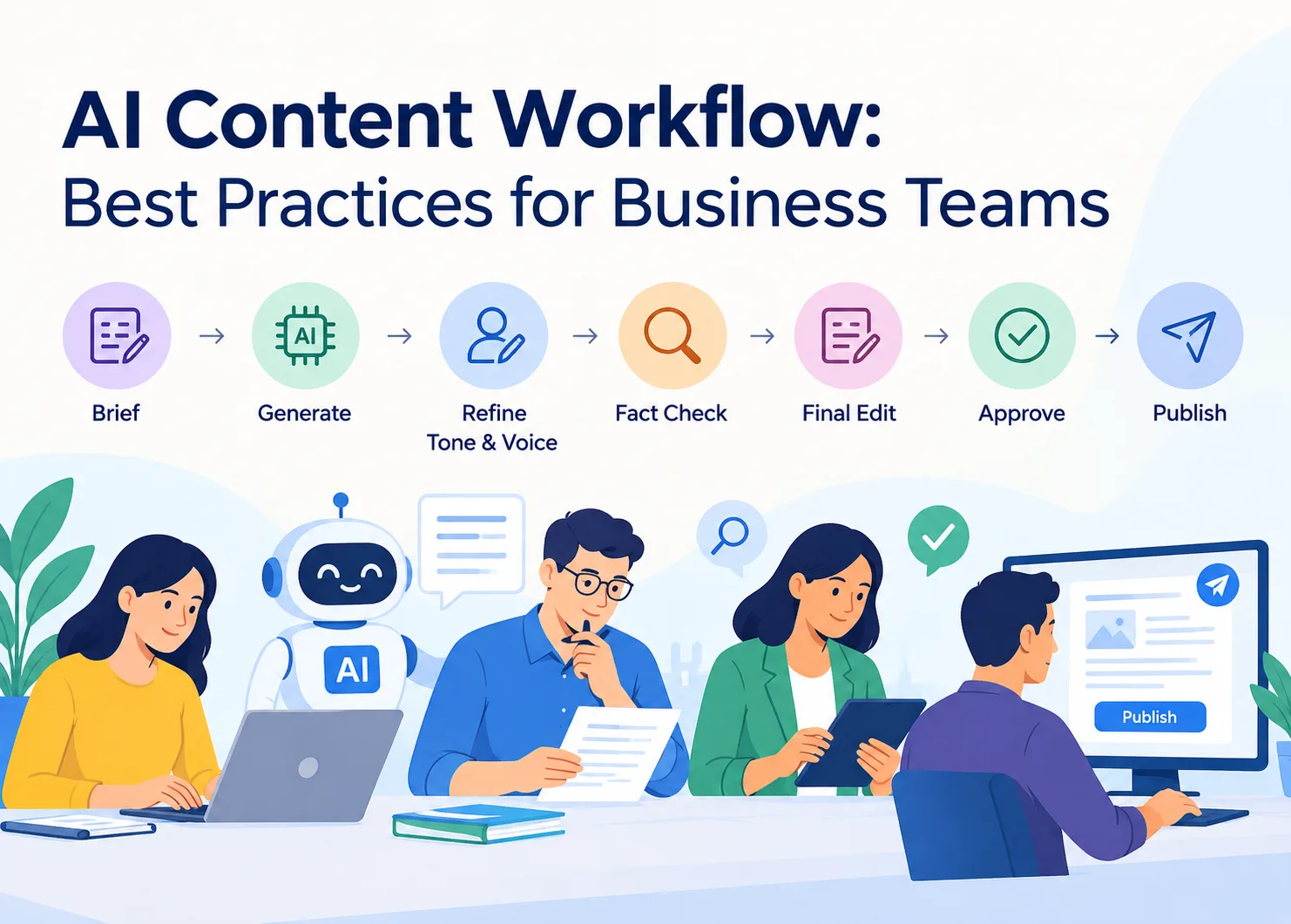
Picture a relay race, not a sprint. Someone writes the brief, the AI generates a draft, a person reviews and adjusts the voice, checks the facts, passes it to whoever signs off. Each leg has a different job. Drop the baton anywhere and it shows up downstream — usually at the worst possible moment, right before a deadline.
The voice step gets cut most often, and it costs the most. AI output has a particular quality to be grammatically clean, logically structured, and somehow completely flat. A paragraph reads fine on its own, then feels wrong sitting next to something a real person on the team wrote last week. Running the draft through a Getsolved content humanizer before it reaches an editor fixes that at the source. Editors stop spending half their notes on rhythm and phrasing. Review gets faster. Feedback gets sharper. For larger teams the compounding effect is real. Twenty pieces a month, three editors, each applying slightly different standards — brand voice drifts.
The Brief Stage
Most AI content problems trace back here. Vague input, vague output. And editing vague output is genuinely slower than scrapping it and writing a better brief in the first place.
What goes into a brief that actually works:
- Who the reader is, what they already know, what they came to figure out
- What the piece needs to do — inform, convert, rank, serve as internal reference
- Tone guidance, especially if brand guidelines exist somewhere
- Points that have to appear, and anything to steer away from
- Format and rough word count
- SEO angle if it applies, and where the keyword should land
- A reference piece or two to match in style
Five minutes on a real brief saves around twenty in review. Every time. Teams that cut this step when they're rushed are the ones with the longest revision cycles, which is a genuinely frustrating pattern to watch repeat.
What a Weak Brief Actually Costs
The math is straightforward. A vague brief produces a draft that needs two or three revision rounds. Each round takes an editor 30-45 minutes. Multiply that across a content calendar of twenty pieces per month and you've burned 20-30 hours just on revisions that a solid brief would have prevented. That's nearly a full working week spent fixing problems that didn't need to exist.
The hidden cost goes beyond time. Writers lose confidence in the process. Editors get frustrated repeating the same feedback. Stakeholders start questioning whether AI content is worth the trouble. None of these reactions are about the AI itself — they're about a missing five-minute step at the very beginning.
Teams that standardize their brief template see revision rounds drop by roughly half within the first month. Not because the AI suddenly got smarter, but because the instructions finally told it what to do.
Generation and the Review Hand-off
Stage | Who owns it | Common mistake |
Brief creation | Content lead or strategist | Too vague, no tone guidance |
AI generation | Writer or content ops | Treating first draft as final |
Tone and voice pass | Writer | Skipped entirely |
Factual review | Subject matter expert | Treated as optional |
Final edit | Senior writer or editor | Fixing AI patterns instead of substance |
Approval | Manager or brand lead | No checklist, subjective sign-off |
One thing worth building in: the person who wrote the prompt shouldn't be the only reviewer. They already know what the piece was supposed to say, which makes it easy to read what's actually there as better than it is. Fresh eyes catch different problems. Sometimes embarrassingly obvious ones.
The Prompt-to-Draft Gap
Most teams treat AI generation as a single step. Write a prompt, get a draft, move on. In practice, the generation stage works better as two passes. The first prompt produces raw material. The second prompt refines that material with specific instructions about structure, examples to include, and sections that need more depth.
This two-pass approach adds maybe ten minutes to the generation stage. It cuts editing time by significantly more. The draft that reaches a human reviewer already has the right structure and approximate depth, so the editor focuses on voice and accuracy instead of reorganizing entire sections.
Another pattern that pays off: saving successful prompts. When a particular brief-and-prompt combination produces a draft that sails through review with minimal edits, document it. Build a prompt library organized by content type. Three months of accumulated good prompts transforms your generation step from experimental to predictable.
QA and the Approval Stage
The same QA checklist doesn't work well for AI content because it fails in different ways than human-written content. Someone might not notice a small thing or get lost in the middle of a long part. AI is able to get every information right, yet nonetheless produce a statement that is bold, technically accurate, and doesn't answer the question the way it was posed. Before a draft moves to approval, teams should check and improve AI-generated content before publishing by verifying claims, removing repetition, reviewing search intent, and adding subject-matter expertise.
Four things to always check: The item must be an exact match to the original material, the style must be consistent with other brand content, the piece must have keywords for SEO purposes, and the piece must really achieve its goal. The latter is most often missed. It’s also where the largest issues like to live.
On sign off – a Slack message saying “looks good” is not a procedure. A shared doc is, with a name and a date. It’s a record that becomes more important than anybody expects later when it has to be traced back or corrected.
Common AI Content Fails QA Should Catch
You learn to recognize them, AI drafts fail in predictable ways. Recognizing these trends makes QA go much faster since the reviewers know exactly where to search.
- Faith in wrongness. In places the draft claims as fact something that sounds plausible but is not exactly true. This usually happens with data, dates and technical requirements. Wrong claims are just as fluent as right ones, because the AI doesn’t hold back or hedge when it should.
- Structural repetition. There are three sections in a row. Each section begins with a general statement, followed by two examples and ending with a summary line. Humans vary their structure instinctively. AI tends toward templates unless specifically instructed otherwise.
- Missing the actual question. The brief asked for a comparison of two approaches. The draft explains both approaches thoroughly but never actually compares them. Everything present is accurate. The piece still doesn't do its job.
- Phantom consensus. Phrases that imply widespread agreement without citing anyone specific. "Experts agree" or "studies show" without any particular expert or study attached. These pass surface-level review easily and erode credibility slowly.
Training reviewers to flag these four patterns specifically cuts QA time faster than any checklist expansion. The patterns repeat across virtually every AI model and content type.
No single tool runs the whole thing. Most teams patch together a small combination that works for their volume and structure. Brief templates are underrated — even a basic shared doc with required fields cuts brief quality problems significantly. For generation, ChatGPT, Claude, Gemini, or something purpose-built depending on volume. A tone layer to adjust AI phrasing before it reaches an editor. A fact-check pass, manual or tool-assisted. An originality check for research-heavy pieces. And a style guide — not software, but teams without one relitigate the same questions in every single review cycle, which gets old fast. Alongside editorial quality checks, teams can optimize content for generative AI by giving direct answers, using clear headings, structuring information for scanning, and adding verifiable facts and original examples.
Build The Stack
It is tempting to add a tool for each phase. Content planning platform, AI generator, grammar checker, plagiarism scanner, project management board, approval process tool. And then the team spends more time maintaining tools than developing content.
Start with three things: a short template, one generation tool, and one assessment tool (grammar, originality, tone). Run that setup for one month. Add the complexity only where real bottlenecks are happening, not where theoretical bottlenecks may be.
The most consistent AI content creators are those who run the simplest stacks. Their advantage isn't better software. It's better handoffs between the humans using it.
What Good Looks Like
A working workflow doesn't guarantee faster turnaround. Not right away. What it gives you first is consistency — fewer revision rounds, less confusion about where a piece is, clearer ownership at each step. Speed follows as a side effect of that consistency, usually after a few months of the process actually running.
The setup itself doesn't need to be complex. Brief, generation, tone pass, factual review, defined approval. That sequence catches most failure points before anything reaches a reader. The only real requirement is that each step has an owner and that "done" means the same thing to everyone.
Final Take
AI handles the fast part. Briefing it, reviewing what it produced, catching what it got wrong — that's still people work, and probably will be for a while. Teams that sort out those handoffs early build something that holds up. Teams that skip it keep seeing the same revision notes on every draft, which is a slow and annoying way to learn the same lesson repeatedly. The tools are there. The workflow is what makes them worth using.
Read More Blogs On: