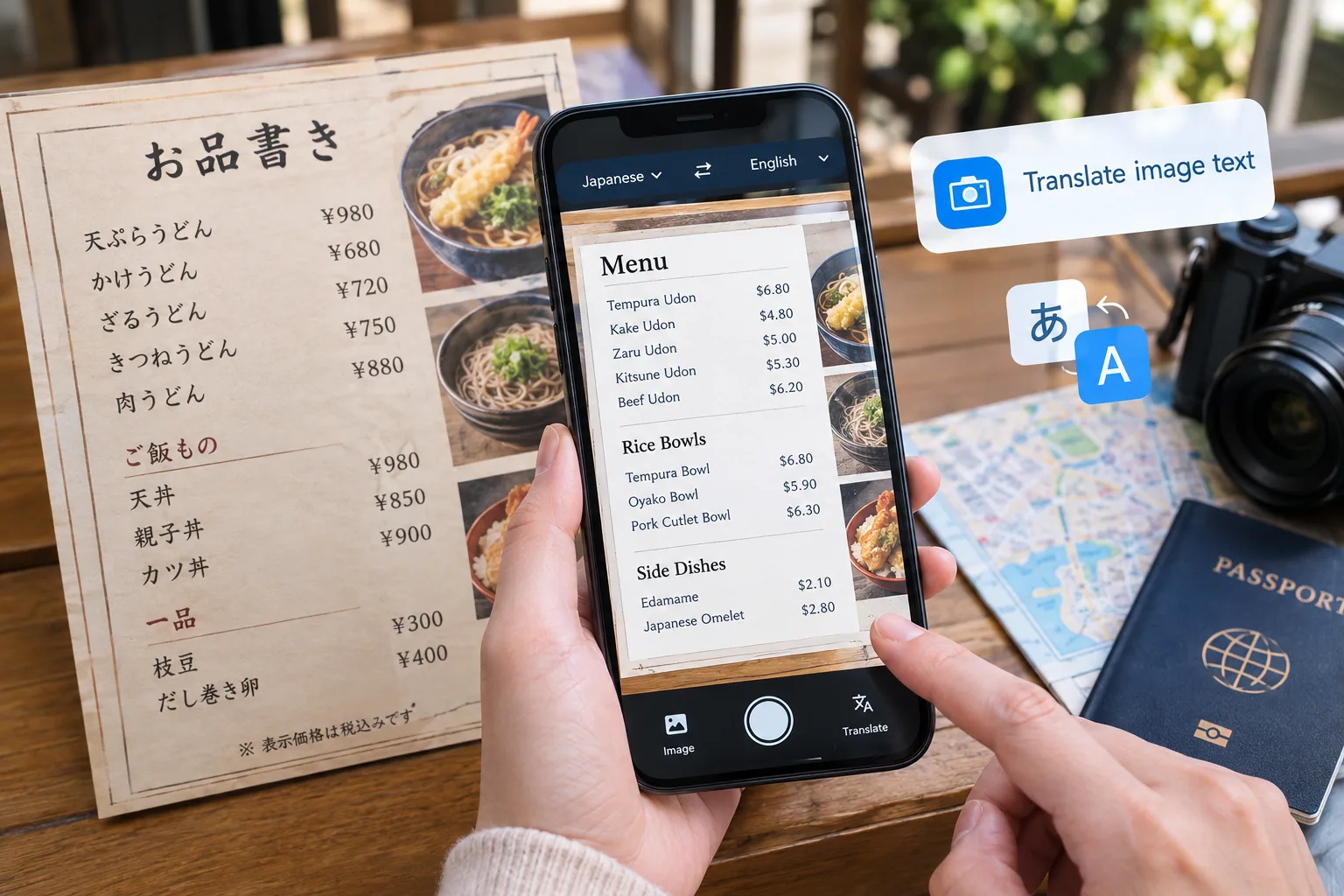
You land in a small town outside Kyoto. The lunch menu at the noodle shop is entirely in kanji. Ten years ago this meant pointing at random items and hoping for the best. Today it means pulling out your phone, snapping a photo, and reading the full menu in your own language within seconds.
That shift happened because two technologies merged: optical character recognition and AI-powered translation. Together, they created the modern image translator, a tool now reshaping how travelers handle written language abroad.
The numbers back this up. The global OCR market grew from $19.15 billion in 2025 to $22.21 billion in 2026, and leading AI OCR models now achieve over 95% character-recognition accuracy on printed-text benchmarks. This is not a niche tool for tech enthusiasts. Millions of everyday travelers use it without even thinking about the technology behind it.
What Is an Image Translator?
An image translator reads text inside a photo and converts it into another language almost instantly. You upload or capture a picture, and the tool extracts the text using OCR, then passes it to an AI translation engine.
Older workflows required scanning a document, copying the recognized text manually, then pasting it into a separate translator. AI-powered image tools are also changing how people work with visual content, as explored in our guide to the top AI image generator tools in 2026. Today's tools collapse that into one step. Upload a photo and the platform will translate picture text automatically, including the layout.
This is why "image translate" has become such a common search term. People want a camera-based, zero-typing way to translate image content on the spot, whether it is a restaurant menu, a street sign, a prescription label, or a scanned contract.
How the Technology Works
Understanding the process makes it easier to know when to trust the output and when to double-check it.
Text detection — OCR scans the photo and locates letters, numbers, and symbols, even on curved bottle labels or stylized menu fonts. In 2026, AI-based OCR handles real-world conditions such as low light, angled photos, and reflective surfaces far better than earlier systems.
Text recognition — The detected shapes are converted into machine-readable characters. AI-based OCR trained on multilingual datasets now handles Japanese, Korean, Arabic, and Thai far more reliably than older engines. For RTL languages like Arabic and Urdu specifically, purpose-built OCR tools outperform general ones by over 20 percentage points in accuracy benchmarks.
Machine translation — The recognized text goes through a neural translation model that reads context rather than swapping words one by one. This is why menu shorthand and regional idioms translate more naturally now than they did even two years ago.
Output — Some tools display the translation below the image. Others overlay it directly on the photo, so a sign in Vietnamese becomes readable in English without losing its layout. The full process from photo to translated text now takes a couple of seconds on most platforms.
Why Travelers Rely on This
Voice translators solve spoken conversation. But most daily friction abroad is written, not spoken and that is the gap an image translator closes.
Menus — Photograph the menu and get an instant translation including dish descriptions and allergen details. No guessing, no pointing at random items, no awkward miming to the waiter.
Signs and notices — Platform changes, closures, and safety warnings posted only in the local language become readable in seconds, right when you have the least time to figure them out. A warning sign mistranslated or ignored can genuinely change your safety on the road.
Documents on the go — Visa forms, rental agreements, and handwritten notes can be photographed and translated without retyping anything. This matters especially for anyone handling paperwork while traveling for work or study abroad.
Receipts — Frequent travelers can scan receipts in any language, extract the text, and translate it for faster expense reporting. No more keeping physical copies of receipts you cannot read.
Study material — Students working with foreign textbooks, printed handouts, or scanned notes can extract and translate text instantly instead of looking up each term by hand a genuine time saver in academic settings. For travelers and students looking to make everyday digital tasks more efficient, other productivity tools can also complement image translation, such as these productivity extensions for Chrome.
Why It Beats Typing Into a Standard Translator
A standard translator asks you to type or paste text. That workflow breaks down the moment you are standing in front of a sign in a script you cannot type like Thai, Arabic, or Japanese. You cannot type what you cannot read.
An image translator removes that barrier entirely. You point your camera and let the technology do the reading. There is no typing, no manual copying, no switching between apps.
Tools built specifically for this reflect this shift clearly. Browser-based options let users upload a photo, screenshot, or scanned document, extract the text through OCR, and translate it into more than 80 languages without requiring an account or installation. The best ones process the image and discard it immediately after rather than storing it which matters when the photo contains an ID card, travel ticket, or signed contract.
What to Look for in an Image Translator
Not all tools perform equally in real travel conditions. Here is what actually matters when you are standing outside a restaurant in a foreign city with a slow data connection:
Language coverage for the scripts you will actually encounter not just major European languages. If you are traveling in East Asia or the Middle East, confirm the tool handles those specific scripts before you rely on it.
Accuracy under real conditions — blurry photos and low light are the norm while traveling, not the exception. Tools that work cleanly only on high-resolution studio images are not useful in practice.
Privacy handling — especially for tools that process IDs, contracts, receipts, or any document with personal information. Look for explicit statements about whether images are stored after processing.
No forced sign-up — the best tools work instantly without requiring an account. When you are standing in front of a train departure board that just changed, you do not have time to verify an email address.
Mobile-first design — most real-world image translation happens through a phone in the moment. A tool that works well on desktop but struggles on a mobile browser is only half useful for travelers.
The Bigger Picture
Understanding a language while traveling no longer means memorizing phrases or carrying a phrasebook. It means having a camera that can read for you instantly, in whatever script it encounters.
As OCR and translation models keep improving with real-time AR overlay and on-device processing already in development the gap between "I cannot read this" and "I understand this" keeps shrinking. Each improvement removes one more barrier between travelers and the places they came to see.
The technology is already good enough to make a genuine difference on a trip. Most people who try it once wonder how they managed without it.
.png)