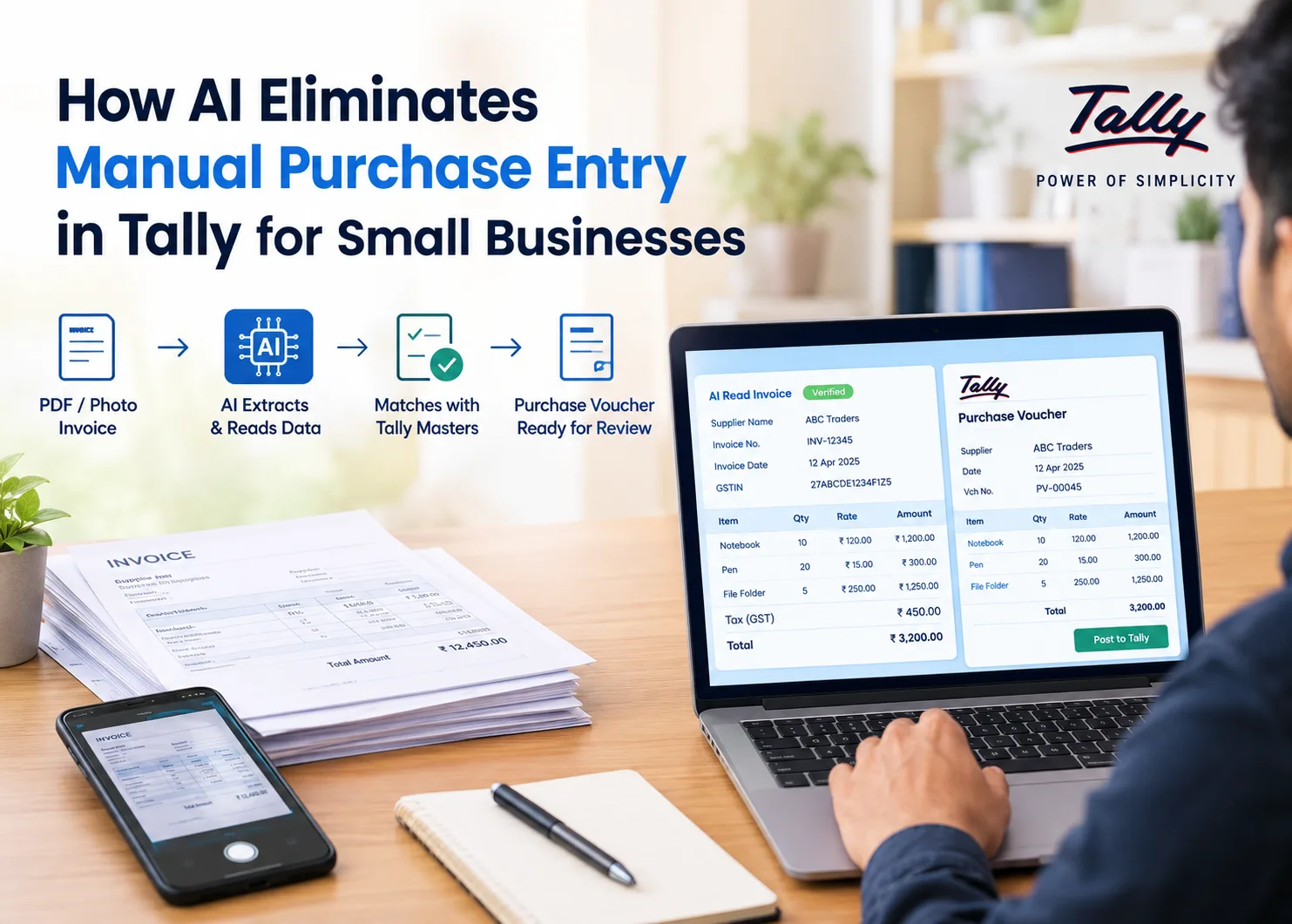
1. The hidden cost of manual purchase entry
A typical distributor or trader receives dozens of supplier bills a week. Some arrive as PDFs on email or WhatsApp. Many still come as paper, handed over with the goods at the godown.
Each bill has to become a purchase voucher in Tally. Someone opens the voucher screen, picks the supplier ledger, then types each line: item, quantity, unit, rate, discount, GST rate. A bill with 20 lines can take 10 to 15 minutes if everything goes smoothly.
Below are some of the major problems:
- Bills pile up. Entry happens in the evening or in a weekend batch, so payables and stock in Tally are always a few days behind reality.
- Small typos become big mismatches. A rate entered as 1,250 instead of 1,205 throws off the supplier balance, the stock value and the GST figures at once.
- GST reconciliation suffers. Input tax credit depends on your books matching what the supplier filed. Every mistyped invoice number or GSTIN is a mismatch someone has to chase at month-end.
- Duplicates slip in. The same bill entered twice, once from the PDF and once from the paper copy, inflates payables until someone notices.
- It depends on one person. In most small firms one accountant knows how each supplier's items map to your stock items. It makes the operation too dependent on one person.
For a business running on thin margins, this is expensive admin work that adds no value.
Why purchase entry is harder than it looks
Reading text off a PDF is easy. Turning it into a correct Tally voucher is harder, for four reasons.
- Every supplier bill looks different. Layouts, column orders, fonts and abbreviations vary from one supplier to the next. Some print rates before tax, some after. Some put discounts on each line, others at the bottom.
- Supplier names for items are not your names. The supplier calls it "PARLE-G 70G CS/120". In your Tally it is "Parle G 70g", sold by the piece. Somebody has to know these are the same item, and that one case equals 120 pieces.
- GST has its own logic. An interstate purchase carries IGST; a purchase within your state carries CGST and SGST. The GSTINs on the bill decide which applies. HSN codes and tax rates must land on the right lines.
- The totals must agree. Round-off, discounts and freight change the final figure. The voucher in Tally must match the grand total printed on the bill to the rupee.
Older OCR tools could read characters but did not understand any of this. They produced raw text that still needed a person to rebuild the entry. Modern AI models understand the structure of an invoice, which is why the job is now practical to automate. This is one example of how AI automation can streamline repetitive business processes by extracting information from documents, validating data, and reducing manual entry.
2. Where AI still needs a human
AI invoice reading is good, and it still makes mistakes. A tool that hides this is more dangerous than no tool at all. Here is where a person still matters:
- Poor photos. Crumpled bills, shadows, or a thumb over a column lower the accuracy. A flat, well-lit photo fixes most of this.
- Handwritten corrections. A supplier who strikes out a rate and writes a new one by hand creates real ambiguity.
- New items. The first time a product appears, someone must tell the system which stock item it is, or create a new one.
- Unusual terms. Schemes, free goods, trade discounts and freight charges are set out differently by every supplier. They need a quick look.
- Judgement calls. Whether a charge belongs in purchases or expenses, or which godown stock goes to, is a business decision.
The right design keeps a human approval step before anything reaches Tally. Automation should prepare the entry and point out doubts. Posting should stay a deliberate act by someone accountable for the books. Strong internal controls, including approval procedures and regular invoice checks, help businesses maintain accurate financial records while reducing the risk of duplicate or unauthorized entries.
4. How AI Turns a Supplier Bill Into a Tally Voucher
AI-powered purchase entry converts an unstructured supplier invoice into a structured accounting transaction that can be reviewed and recorded in Tally. The process combines document recognition, field extraction, supplier and stock-item matching, calculation checks, and accounting-system integration.
For distributors using Tally Prime or Tally ERP 9, the objective is to eliminate repetitive transcription without bypassing accounting controls. Instead of manually entering every invoice line, the accountant reviews a prepared voucher, resolves flagged discrepancies, and approves the transaction for posting.
The following six stages explain how AI tools for accounting automation can support this workflow.
Step 1: Capture and classify the supplier invoice
The workflow begins when an employee uploads a supplier invoice as a PDF, submits a scanned copy, or photographs a paper bill using a mobile phone.
The document-processing system receives the file and identifies its format. If it is a scanned PDF or photograph, image preprocessing may correct rotation, improve contrast, detect page boundaries, and make printed characters easier to recognise.
Document classification then determines whether the file appears to be a purchase invoice, sales invoice, purchase order, or another document type. This distinction matters because a purchase invoice contains information needed to prepare an accounting transaction, while a purchase order represents an order and does not necessarily establish that goods have been received or invoiced.
For multi-page invoices, the system must identify continuation pages and associate their item lines with the correct invoice header and totals.
Technical control: Retain the original file and associate it with the processing record. If the invoice is incomplete, unreadable, or missing a page, flag it before proceeding. A document that has been uploaded successfully is not necessarily suitable for automated processing.
Step 2: Extract invoice headers, line items, and tax details
After classification, the system uses OCR and document-understanding techniques to extract the invoice's structured fields.
Header extraction identifies supplier details, GSTIN, invoice number, invoice date, recipient information, and other relevant references. Line-item extraction identifies product descriptions, HSN codes where provided, quantities, units, rates, discounts, taxable values, and applicable tax details.
The system must also distinguish item rows from subtotal lines, tax summaries, freight charges, and other invoice-level adjustments.
For example, an invoice may contain 15 stock items followed by separate CGST, SGST, freight, and round-off lines. The extraction process must not treat these summary values as additional stock items.
Where supported, extracted values should retain references to their source locations in the document. This allows an accountant to compare a questionable quantity or rate with the original invoice rather than searching through the entire file.
Technical control: Validate mandatory fields, flag unreadable values, and preserve the distinction between line-level and invoice-level amounts. AI tools for finance and accounting should expose uncertain extractions instead of silently filling missing information with guesses.
Step 3: Validate arithmetic and accounting consistency
Once the invoice data has been extracted, the system checks whether the figures agree with one another.
At line level, it can compare the quantity, rate, discount, and calculated taxable value. At invoice level, it can compare the sum of taxable line values, tax amounts, charges, and rounding adjustments with the printed grand total.
For example, if a line records 20 units at ₹500 each with a 10% discount, the expected taxable value before applicable taxes is ₹9,000:
20 × ₹500 = ₹10,000
₹10,000 − ₹1,000 discount = ₹9,000
If the extracted line value is ₹9,900, the system should flag the discrepancy and identify the fields requiring verification.
Tax validation should also check whether the extracted tax components agree with the stated taxable values and whether the invoice's tax structure is consistent with the available transaction details. These checks can identify potential errors, but they do not replace professional review of complex GST treatment.
The system should record the difference and its likely cause rather than modify the source figures just to make the totals balance.
Technical control: Apply explicit validation rules and documented rounding tolerances. Unresolved differences should prevent automatic approval under the business's configured controls.
Step 4: Match the supplier and stock items to Tally masters
After validation, the system maps the extracted invoice information to the supplier ledger and stock items already maintained in Tally.
Supplier matching can use the supplier's GSTIN, name, and existing ledger information. Stock-item matching can consider product descriptions, brand, size, supplier-specific item codes, approved historical mappings, and configured units of measure.
Consider a supplier invoice that lists PARLE-G 70G CS/120, while the corresponding Tally stock item is Parle G 70g.
The system may propose the existing stock item as the match, but it must also establish whether the supplier's quantity represents cases or individual pieces. If one case contains 120 pieces, the conversion must follow the configured purchase and stock units.
When a description matches multiple products or the unit conversion is unknown, the system should flag the line for review. It should not create a new stock master simply because the supplier's wording differs from the existing name.
Once an authorised employee confirms a mapping, the system can reuse that mapping on subsequent invoices from the same supplier. Changes in product codes, pack sizes, or variants should trigger additional checks.
Technical control: Maintain approved supplier-to-item mappings and unit-conversion rules. Record unresolved matches as exceptions and require confirmation before they affect inventory records.
Step 5: Generate a draft purchase voucher for approval
With the invoice fields validated and the relevant masters identified, the system prepares a draft purchase voucher containing the proposed transaction details.
Depending on the integration and business configuration, the draft may include:
- Supplier ledger and supplier invoice reference.
- Invoice date and other relevant document details.
- Matched stock items, quantities, and purchase rates.
- Discounts, taxable values, and applicable GST components.
- Freight or other charges, where relevant.
- Calculated totals and reconciliation results.
The review interface should present the original invoice alongside the proposed voucher. This is particularly important for uncertain item matches, unusual discounts, handwritten corrections, tax discrepancies, and invoice-total differences.
Duplicate detection should compare the invoice against existing records using relevant identifiers, such as supplier, invoice number, date, and available supporting details. A potential duplicate should be investigated before posting.
The reviewer then corrects the flagged fields, confirms unresolved mappings, and approves the transaction according to the business's authorisation rules.
Technical control: Separate extraction from approval. The system should preserve the proposed values, corrections, exception resolutions, and approval history so that the business can investigate how a voucher was prepared.
Step 6: Post the approved voucher to Tally and confirm the result
After approval, the integration transfers the transaction to the correct Tally company using its supported integration method.
The posting process must preserve the approved supplier ledger, stock-item references, quantities, rates, tax details, and other voucher fields. It must also handle operational failures such as a disconnected system, an unavailable company, a rejected voucher, or an incomplete transfer.
A successful extraction does not prove that the voucher was created successfully. The integration should confirm the posting outcome and retain the resulting voucher reference where available.
Retry handling is particularly important. If a connection fails after Tally receives the transaction but before the integration receives confirmation, blindly submitting the same voucher again could create a duplicate. The system should check the posting status or use an appropriate transaction-identification mechanism before retrying.
Once posting is confirmed, the purchase transaction appears in Tally according to the company's configuration, and the relevant accounting records and stock information are updated as applicable.
Technical control: Track each invoice through identifiable processing states, such as received, extracted, awaiting review, approved, posting, and posted or failed. Keep failed transactions visible until they are resolved rather than treating them as completed.
What this workflow changes for distributors
The main benefit of AI tools for accounting is the reduction of repetitive work across the invoice-to-voucher process. However, the improvement should be measured across the entire workflow, including exceptions and posting failures.
A distributor can monitor four practical indicators:
- Processing time per invoice: Measure the time spent on extraction review, corrections, approval, and posting rather than measuring extraction speed alone.
- First-pass accuracy: Track the percentage of invoices whose critical fields and calculations are correct without correction.
- Exception rate: Measure the percentage of invoices requiring manual intervention because of unreadable fields, unmatched items, tax discrepancies, or duplicate warnings.
- Successful posting rate: Track the percentage of approved invoices that become confirmed Tally vouchers without duplicate or failed transactions.
These measures help determine whether AI-powered purchase entry is reducing the actual workload or simply shifting it from typing to error correction. For businesses comparing AI tools for accounting and finance, the most useful solution is one that combines reliable extraction with accurate master mapping, transparent validation, controlled approval, and dependable Tally integration.
5. How to choose an AI purchase entry tool
Many tools claim to "automate" purchase entry. Ask these questions before you pick one:
Question to ask | Why it matters |
Does it work with both PDFs and phone photos? | Paper bills are still common in Indian distribution. PDF-only tools leave half the work manual. |
Does it match lines to your existing Tally stock items and ledgers? | Without matching, you get duplicate masters and messy stock reports. |
Does it handle unit conversion (case vs piece, box vs strip)? | Supplier units rarely match how you stock and sell. |
Does it check the bill's totals against the printed grand total? | This catches misreads before they reach your books. |
Does it flag duplicate invoice numbers? | Prevents the same bill being posted twice. |
Is there a review step before posting? | Nothing should enter Tally without a person's approval. |
Does it remember mappings? | Learning once per supplier item is what makes the tool faster over time. |
Can staff use it from a phone? | Bills arrive at the godown, not at the accountant's desk. |
As one example, Takkada lets distributors import purchase bills from PDF into Tally from a phone. It reads the bill, matches lines to existing masters, reconciles unit differences, and posts a purchase voucher only after someone approves the draft. Whatever tool you consider, run it on a week of your real bills before committing.
Getting started: a simple checklist
- Clean your masters first. Merge duplicate stock items and supplier ledgers in Tally. AI matching works best against a tidy list.
- Start with your top five suppliers. They make up most of your bill volume. Map their items in the first week.
- Set a photo standard. Flat bill, good light, whole page in frame. Share it with godown staff.
- Decide who approves. One accountable person should review and post, even if others upload.
- Run in parallel for two weeks. Compare AI-prepared vouchers with your usual entry, then switch over once you trust the results.
- Review GST reports at month-end. Check whether input tax credit mismatches have dropped. That is the clearest measure of success.
6. How to Measure the ROI of AI-Powered Purchase Entry
Implementing AI tools for accounting automation involves more than comparing software prices. A distributor must account for subscription or implementation fees, staff time spent reviewing extracted invoices, exception handling, integration costs, and the cost of correcting errors.
The return on investment (ROI) depends on how much of the existing purchase-entry workload the system removes, how accurately it prepares vouchers, and how much manual intervention remains necessary. When evaluating AI accounting software, businesses should measure these operational improvements alongside the total cost of implementation and ongoing use.
A practical assessment compares the current manual process with the AI-assisted workflow using the same invoice volume and comparable accounting requirements.
6.1. Calculate monthly labour savings
Start by measuring how much staff time is currently spent entering, checking, and correcting supplier invoices.
Suppose a distributor processes 600 invoices per month. Under the existing manual workflow, each invoice takes an average of 12 minutes to enter and check. After implementing an AI-assisted system, the accountant spends an average of 4 minutes reviewing, correcting, and approving each invoice.
The monthly time comparison would be:
| Metric | Manual workflow | AI-assisted workflow |
|---|
| Monthly invoices | 600 | 600 |
| Average staff time per invoice | 12 minutes | 4 minutes |
| Total monthly processing time | 120 hours | 40 hours |
| Monthly time saved | — | 80 hours |
The calculation is:
Monthly hours saved = Invoice volume × (Manual minutes − AI-assisted minutes) ÷ 60
For this example:
600 × (12 − 4) ÷ 60 = 80 hours saved per month.
These figures are illustrative, not a performance guarantee. Actual savings depend on invoice complexity, extraction accuracy, the number of exceptions, and the time required for approval and posting.
Also distinguish between time saved and cash saved. If the accountant uses the freed-up time for reconciliation, supplier follow-ups, or other work, the business gains productive capacity. A direct payroll saving occurs only if the business actually reduces paid hours or avoids additional staffing costs.
6.2. Calculate the cost per processed invoice
Cost per invoice provides a consistent way to compare manual processing with automation. It is also useful when assessing whether AI for accounting delivers measurable cost reductions rather than simply transferring work from data entry to invoice review.
Suppose the fully loaded accounting labour cost is ₹300 per hour. This illustrative rate includes the relevant employment costs allocated to the work.
Under the manual workflow, the processing cost per invoice is:
12 ÷ 60 × ₹300 = ₹60 per invoice.
With AI-assisted processing taking four minutes per invoice:
4 ÷ 60 × ₹300 = ₹20 per invoice.
The labour cost reduction is ₹40 per invoice, or ₹24,000 per month across 600 invoices, before accounting for software, implementation, and other operating costs.
| Cost component | Manual workflow | AI-assisted workflow |
|---|
| Staff time per invoice | 12 minutes | 4 minutes |
| Labour cost per invoice | ₹60 | ₹20 |
| Monthly labour cost for 600 invoices | ₹36,000 | ₹12,000 |
| Monthly labour cost difference | — | ₹24,000 |
The AI-assisted figure represents the labour allocated to processing, not the complete cost of the automated system. Software fees, implementation, training, integration maintenance, and additional exception-handling costs must still be included.
This distinction helps businesses compare AI tools for small business accounting using total operating costs rather than software subscription prices alone. It also provides a more realistic way to assess accounting AI software before committing to a long-term subscription.
6.3. Include software and implementation costs
The next step is to calculate the net financial benefit after all automation expenses. The cost of AI accounting software should be evaluated against the savings demonstrated during a pilot, rather than relying on advertised efficiency claims.
Suppose the business saves ₹24,000 in monthly labour cost, while the AI purchase-entry solution costs ₹10,000 per month and requires ₹30,000 in one-time implementation and training expenses.
The recurring monthly benefit before other costs would be:
₹24,000 − ₹10,000 = ₹14,000 per month.
The simple payback period for the initial ₹30,000 investment would be:
₹30,000 ÷ ₹14,000 = approximately 2.14 months.
This calculation assumes the monthly savings are realised consistently and excludes additional implementation, support, correction, and maintenance costs not already included.
For a fuller assessment, use the following formula:
Monthly net benefit = Labour cost avoided + Other verified savings − Recurring automation costs
First-year ROI = (First-year financial benefits − First-year total costs) ÷ First-year total costs × 100
First-year total costs should include the implementation expense, recurring software charges, integration costs, training, maintenance, and any additional review work. Financial benefits should include only savings the business can reasonably substantiate, avoiding double-counting labour savings and productivity benefits.
6.4. Measure the cost of invoice corrections
Processing time alone does not establish whether an AI tool is improving accounting accuracy. A system that prepares vouchers quickly but produces frequent incorrect rates, quantities, or tax fields may create additional reconciliation work.
This is an important consideration when assessing AI accounting solutions: the time saved during data extraction must be weighed against the cost of correcting inaccurate entries.
Track the number of invoices requiring correction and the average time spent resolving each error.
For example, suppose a distributor processes 600 invoices per month. Under manual entry, 8% of invoices require corrections, and each correction takes an average of 10 minutes.
That represents:
600 × 8% = 48 invoices requiring correction.
48 × 10 minutes = 480 minutes, or 8 hours of correction work per month.
If the AI-assisted process reduces the correction rate to 3%, with the same average correction time, the workload becomes:
600 × 3% = 18 invoices.
18 × 10 minutes = 180 minutes, or 3 hours per month.
The difference is five hours of correction work per month. At a labour cost of ₹300 per hour, that represents ₹1,500 in additional potential labour savings, provided this correction work is separate from the processing time already included in the earlier calculation.
Use a consistent definition of a correction. For example, record whether an invoice required a change to the supplier, stock item, quantity, rate, discount, GST fields, or invoice reference. This reveals which validation rules need improvement.
6.5. Track invoice-to-voucher turnaround time
Purchase-entry automation can also reduce the time between receiving a supplier invoice and posting the approved purchase voucher.
Define the metric as:
Turnaround time = Confirmed voucher-posting timestamp − Invoice-receipt timestamp
Measure the elapsed time for both the manual and AI-assisted workflows. Where useful, distinguish business hours from calendar hours and report median and 90th-percentile turnaround times to identify invoices that remain delayed.
For example, a distributor may find that straightforward PDF invoices are posted within a few hours, while photographed bills with unclear item descriptions remain pending for a day. That difference may indicate a need for better image capture, improved supplier mappings, or faster exception approval.
Faster posting can improve the timeliness of purchase records and help staff investigate discrepancies sooner. However, turnaround time should never be improved by removing necessary validation or approval steps.
6.6. Evaluate the full operational impact
Before selecting among AI tools for accounting and finance, compare the following indicators over a representative baseline period and pilot period. These measurements help determine whether an Accounting AI implementation improves the complete purchase-entry workflow, from invoice receipt to confirmed voucher posting.
| KPI | Calculation | What it reveals |
|---|
| Processing time per invoice | Total staff minutes ÷ invoices processed | Efficiency of the complete workflow |
| Cost per invoice | Total allocated processing cost ÷ invoices processed | Unit economics of purchase entry |
| Correction rate | Invoices requiring correction ÷ total invoices × 100 | Frequency of entry errors |
| Exception rate | Invoices requiring manual intervention ÷ total invoices × 100 | How often automation cannot proceed without help |
| Successful posting rate | Confirmed posted vouchers ÷ approved invoices submitted for posting × 100 | Reliability of the Tally integration |
| Duplicate prevention rate | Confirmed duplicate attempts correctly flagged ÷ known duplicate attempts tested × 100 | Effectiveness of duplicate controls |
| Invoice-to-voucher turnaround | Time from receipt to confirmed posting | Speed of accounting updates |
Evaluate the metrics together. A lower processing time is not a successful outcome if correction rates increase or invoices remain stuck in the approval queue.
The best AI tools for accounting automation should improve throughput while maintaining acceptable accuracy, traceability, and accounting controls. For a distributor, the business case is strongest when the pilot demonstrates measurable reductions in total processing costs, fewer corrections, and faster confirmed posting without compromising the quality of the books.
7. How AI Purchase Entry Handles Different Supplier Invoice Formats
Supplier invoices rarely follow a standard format. A distributor may receive digitally generated PDFs from one supplier, scanned bills from another, and mobile photographs of printed invoices through WhatsApp. Some suppliers use detailed product descriptions, while others rely on abbreviations, internal item codes, or different units of measurement.
This is where AI for accounting becomes useful. Instead of requiring staff to enter every invoice field manually, an AI-powered purchase-entry workflow extracts invoice information, converts it into a consistent structure, validates the data, and prepares it for entry into Tally. However, the accuracy of AI accounting software depends on how well it handles different document types, identifies uncertain information, and routes incomplete invoices for review.
7.1 Processing Digitally Generated PDF Invoices
Digitally generated PDFs are often easier to process because their text can be extracted directly. The system can identify information such as the supplier's name, GSTIN, invoice number, invoice date, item descriptions, quantities, rates, discounts, taxable values, and tax amounts.
For example, a supplier invoice may contain 25 units of a product priced at ₹400 each, with a 5% discount. The system can extract the line-item details, calculate the expected value of ₹9,500, and compare it with the amount shown on the invoice.
However, extracting text does not automatically make the purchase entry accurate. The system must still verify the calculations, identify the correct supplier ledger, and match the invoice items with the appropriate stock masters in Tally. This combination of extraction and validation is what separates a useful accounting AI software workflow from a basic PDF-to-text converter.
7.2 Reading Scanned Invoices and Mobile Photographs
Scanned invoices and mobile photographs require additional processing because the information is embedded in an image. Optical character recognition (OCR) converts the visible text into machine-readable data, while AI-based document processing helps identify which values represent invoice numbers, quantities, prices, tax rates, and totals.
Image quality directly affects extraction accuracy. Blurred photographs, folded pages, shadows, tilted images, faded printing, and handwritten corrections can make important fields difficult to interpret.
Consider a supplier invoice where the quantity could be either 18 or 13 units because the image is unclear. A reliable AI accounting workflow should flag the quantity as uncertain rather than choosing one value automatically. The reviewer should be able to compare the extracted value with the original invoice, correct it, and confirm the data before the purchase voucher is posted.
For distributors receiving invoices through email or WhatsApp, retaining the original document alongside the extracted information also makes verification easier. Staff can check the source invoice without searching through separate folders or messages.
7.3 Handling Multi-Page Supplier Bills
Large supplier invoices may contain dozens of stock items across multiple pages. The supplier's GSTIN and invoice number may appear on the first page, while the final taxable value and GST summary appear on the last. Processing each page independently can result in missing line items, repeated headers, or incorrect invoice totals.
AI accounting systems should identify pages belonging to the same invoice and combine the extracted information into one document record. They must distinguish actual product entries from repeated column headings, page numbers, terms and conditions, and intermediate subtotals.
For example, if a supplier submits a three-page invoice containing 60 product lines, the system should capture all 60 lines, preserve their quantities and rates, and reconcile the combined values against the invoice summary.
If a page is missing or part of a table cannot be read, the invoice should be flagged as incomplete. The system should not prepare a final voucher using only the lines it managed to extract.
7.4 Recognising Different Supplier Invoice Layouts
Suppliers may display the same information in different places. One invoice may show the GSTIN near the supplier's address, while another places it in the footer. Item descriptions, HSN codes, discounts, freight charges, and tax summaries may also appear under different headings or within differently structured tables.
AI-based document processing identifies relevant fields using labels, surrounding text, table structures, and relationships between values. It then maps the extracted information to a consistent format that the purchase-entry workflow can use, regardless of the supplier's original layout.
This step is important because Tally requires data to be assigned to the correct accounting fields. A number extracted from a table should not automatically be treated as a quantity, rate, tax percentage, or ledger amount without checking its context.
Businesses using AI accounting software should also test the system against invoices from their actual supplier base. A tool that processes one supplier's PDF accurately may perform differently when it encounters a new layout or an unfamiliar invoice template.
7.5 Matching Inconsistent Item Descriptions with Tally Stock Masters
Supplier descriptions often differ from the names stored in Tally. For example, a supplier may list an item as “Parle-G Biscuit 70g,” while the corresponding stock master is named “Parle G 70 GM.”
AI can suggest a match by comparing product names, brand, pack size, packaging details, and previously approved supplier-item mappings. However, similar names do not always refer to the same product. A 70 g pack and a 100 g pack, for example, should not be treated as interchangeable.
A practical AI for accounting workflow should support three outcomes:
- Confirmed match: The item matches an existing stock master through reliable identifiers or an approved mapping.
- Suggested match: The system identifies a likely match but asks the user to verify it.
- No reliable match: The item is sent for manual mapping rather than being assigned to an unrelated stock item.
Unit conversions also need to be considered. If a supplier invoices 10 cases containing 12 bottles each, the system must apply the correct case-to-bottle conversion only when that conversion is supported by the relevant stock configuration. Incorrect matching or conversion can distort inventory quantities even if the invoice's monetary total is correct.
Once an authorised user confirms a recurring supplier-item mapping, the system may reuse it for future invoices, provided the product details remain consistent.
An important part of reliable AI accounting is distinguishing between information that is missing from an invoice and information that the system could not extract.
For example, a purchase order number may be absent because the supplier did not include it. Alternatively, the number may be present but obscured by a stamp. The first situation may be acceptable under the company's workflow, while the second may require the invoice image to be checked.
If a required field—such as the supplier identity, invoice number, quantity, rate, or relevant tax information—is missing or unreadable, the system should flag the issue before posting. Optional fields can be handled according to the business's configured rules.
A suitable review process should:
- Highlight the missing or uncertain field.
- Display the relevant area of the original invoice.
- Explain why the invoice needs attention.
- Allow an authorised user to correct the extracted value.
- Run the relevant validations again before approval or posting.
This prevents uncertain OCR results from becoming unverified accounting entries.
The key takeaway: Effective AI accounting software does more than read invoices. It handles different document formats, normalises supplier data, matches items against Tally stock masters, validates calculations, and sends uncertain records for review. For distributors and traders, these capabilities make automated purchase entry more practical without removing the need for accounting controls.
8. What Happens When AI Purchase Entry Fails or Finds a Discrepancy?
AI purchase entry does not always produce a voucher that is ready to post. Invoice totals may not match, stock items may be unidentified, GST details may conflict, or the connection between the purchase-entry system and Tally may fail.
A reliable AI accounting workflow must handle these exceptions without silently changing invoice values, creating incorrect vouchers, or posting the same purchase twice. This is an important consideration when evaluating accounting AI software: invoice extraction is only one part of the process. The system must also identify problems, record what happened, and route unresolved cases to the appropriate reviewer.
8.1 When Invoice Totals Do Not Match
The system should compare the extracted line-item values, discounts, taxable amounts, tax components, additional charges, round-off, and final invoice total. It should calculate the expected amount using the invoice's actual pricing and tax structure rather than relying on a simplified calculation that ignores discounts or additional charges.
For example, an invoice may contain the following details:
| Invoice component | Amount |
|---|
| Taxable value | ₹20,000 |
| CGST | ₹1,800 |
| SGST | ₹1,800 |
| Freight | ₹500 |
| Round-off | −₹0.50 |
| Expected invoice total | ₹24,099.50 |
If the extracted invoice total is ₹24,599.50, the system should flag a difference of ₹500 instead of automatically changing a ledger or modifying a line item to make the figures balance.
The exception should clearly state the expected and extracted amounts. An authorised user can then inspect the original invoice, determine whether a charge was omitted or misread, correct the data, and run the validation again.
Small rounding differences may be acceptable under the business's configured rules, but material discrepancies should require review. AI should not use an arbitrary tolerance to hide a genuine error.
8.2 When a Stock Item Cannot Be Identified
A supplier may introduce a new product, use an unfamiliar abbreviation, or describe an item differently from the name stored in Tally. The system may also identify multiple possible matches without enough information to select the correct one.
Instead of automatically choosing the closest name, the workflow should display the supplier's description alongside potential matches from the stock master. An authorised user can select the correct existing item, approve the creation of a new stock master where appropriate, or update the supplier-item mapping.
For example, “Cooking Oil 1L Case” could refer to a case containing 12 bottles or 15 bottles. Selecting the wrong item or applying the wrong unit conversion can distort inventory records and purchase values.
A reliable AI accounting software workflow should therefore check relevant attributes such as product size, brand, packaging, unit of measurement, and approved conversion rules. If the system cannot establish a reliable match, the affected invoice should remain in the review queue.
8.3 When GST Details Conflict
GST-related exceptions can occur when a supplier's GSTIN is missing or incorrectly extracted, tax amounts do not reconcile with the invoice, or the tax components appear inconsistent with the transaction details.
For example, the extracted invoice may show CGST and SGST, while other transaction details indicate that the tax treatment needs further verification. The system should not automatically replace these amounts with IGST or make another tax adjustment without checking the relevant information.
A well-configured AI purchase-entry workflow should:
- Check the GSTIN's format and compare it with the supplier master where appropriate.
- Reconcile extracted tax amounts against taxable values and stated rates.
- Flag conflicts involving supplier details, tax components, or configured tax rules.
- Route material discrepancies to an authorised accounting reviewer before posting.
These checks help identify potential errors, but they do not replace a complete GST compliance review. The correct tax treatment depends on the actual transaction and applicable rules, not just on the text extracted from an invoice.
8.4 When the Tally Connection Fails
A connection failure is different from an invoice-data error. The invoice may be accurate and the voucher may be correctly prepared, but the system may fail to communicate with Tally because of a network interruption, a closed application, a timeout, or an integration issue.
The critical question is whether Tally received and saved the voucher before the connection failed. A timeout does not necessarily mean that posting failed; the voucher may already exist even if the purchase-entry system did not receive confirmation.
A safe recovery process should follow these steps:
- Record the failed attempt: Save the invoice reference, timestamp, attempted action, and available error details.
- Check the posting status: Query Tally or the integration's available records to determine whether the voucher was created.
- Retry only when appropriate: If the system confirms that no voucher was created, retry according to the configured retry policy.
- Prevent duplicate posting: If the outcome is uncertain, check existing voucher records before attempting another creation.
- Escalate unresolved cases: If the posting status cannot be established, send the invoice for manual verification.
This process is especially important for distributors processing high volumes of supplier invoices. Blindly retrying every failed request can create duplicate purchase vouchers, while treating every timeout as a permanent failure can leave valid purchases unposted.
8.5 Error Logs, Retry Mechanisms, and Duplicate Prevention
When businesses implement AI for accounting, error tracking is just as important as extraction accuracy. Logs allow authorised staff to understand why a purchase entry failed, what action was attempted, and whether the issue was resolved.
A useful error log should capture:
- Invoice reference and supplier identifier.
- Date and time of the processing or posting attempt.
- The stage where the error occurred.
- The error category and available technical details.
- Whether a voucher was created or its status remains uncertain.
- Retry attempts and their outcomes.
- Corrections, approvals, and final resolution.
Access to logs should be restricted according to the business's security policies, and sensitive invoice information should not be retained unnecessarily.
Retry mechanisms must distinguish between temporary technical failures and accounting exceptions. A connection timeout may justify a controlled retry after checking the voucher status. An unidentified stock item or a GST discrepancy will not be resolved by repeatedly submitting the same invoice; the underlying issue must be corrected first.
Duplicate prevention should use reliable invoice identifiers, supplier details, invoice dates, invoice numbers, and existing voucher records where available. Because suppliers may reuse invoice numbers or staff may enter them inconsistently, a single field should not always be treated as definitive proof that two invoices are duplicates. Suspected duplicates should be flagged for verification.
Where supported by the integration, a unique processing reference or idempotent posting mechanism can help prevent repeated requests from creating additional vouchers. The exact safeguards depend on the integration and Tally environment.
8.6 How Approval Queues Prevent Errors from Reaching Final Accounts
Not every exception needs the same response. A useful AI accounting workflow routes invoices according to the issue and its potential impact.
| Exception type | Recommended action |
|---|
| Unreadable invoice number or quantity | Check the original invoice and correct the extracted field |
| Unmatched stock item | Confirm the stock master or approve a new mapping |
| Invoice total mismatch | Reconcile line items, discounts, taxes, and additional charges |
| GST conflict | Refer the invoice to an authorised accounting reviewer |
| Possible duplicate invoice | Compare existing records before proceeding |
| Uncertain Tally posting status | Verify whether the voucher already exists |
| Temporary connection failure | Check the posting state before retrying |
After an exception is resolved, the system should repeat the relevant validation checks. The invoice can then proceed to approval or posting according to the company's configured controls.
Approval permissions also matter. The person correcting extracted data may not need permission to approve or post the final voucher. Separating these responsibilities can reduce the risk of unreviewed changes reaching the books.
When comparing AI accounting software, businesses should check whether exception queues, correction history, retry handling, duplicate checks, and approval controls are actually supported. These features should be verified during testing rather than assumed to be available in every tool.
The key takeaway: Effective AI for accounting must include a clear exception-handling process. It should identify discrepancies, maintain useful error logs, distinguish technical failures from accounting issues, prevent duplicate vouchers, and keep unresolved invoices out of final accounts until the appropriate checks are complete.
9. Conclusion
Manual purchase entry in Tally is one of the last big typing jobs left in small business accounting. AI can now read supplier bills, understand GST and match lines to your own items well enough to prepare the voucher for you.
The businesses that benefit most keep a person in the loop, start with clean masters, and give the system a few weeks to learn their suppliers. The result is books that are current, fewer GST headaches, and an accountant who spends time on judgement instead of keystrokes.
Read More Blogs On