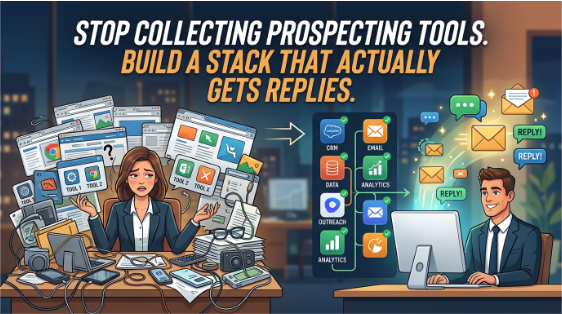
It's Monday morning. You have fourteen browser tabs open, three different contact databases, a sequencing tool that sends emails from a domain nobody checked, and a spreadsheet that's supposed to tie it all together. You've sent sixty messages since Friday. You've had two replies, and one of them was an unsubscribe request.
This is what happens when prospecting tools get bought before anyone decides what they're for. Each tool promised to fix a single problem, and together they've created a new one. The reps aren't lazy, and the tools aren't useless. The stack just grew without a plan. The fix isn't finding the one perfect product. It's understanding which jobs need doing, and choosing the simplest setup that does them well.
Start With the Jobs, Not the Product Pages
Before you compare features, write down what your prospecting process actually needs to accomplish. For most teams, the work breaks into a handful of jobs:
Finding the right accounts. Which companies fit your ideal customer profile? This usually means firmographic filters like industry, size, and location.
Finding the right people. Which roles within those companies have the problem you solve, and how do you reach them? This is where contact data quality matters most.
Knowing when to reach out. Which accounts show signals worth acting on now, such as a new hire in a relevant role, a funding announcement, or a job posting that suggests a pain point?
Sending and tracking outreach. How do messages go out, how are follow-ups scheduled, and where do replies get logged?
Keeping the data clean. Who owns the records, how often are they updated, and what happens when a contact changes jobs?
Once you've mapped these jobs, you can see which ones are already handled by your CRM and which ones have genuine gaps. Many teams discover they're paying for two tools that do the same job while another job goes unserved entirely.
Most prospecting tools fall into a few broad groups. Knowing the categories helps you avoid buying overlapping products.
Contact and account databases supply firmographic and contact information. Their value depends almost entirely on accuracy and freshness, so ask for sample records in your target market and check a dozen of them by hand before committing.
Sequencing and outreach platforms automate multi-step email and social touchpoints. They're useful for consistency, but they also make it easy to send poor messages at high volume. Watch for deliverability settings, because a sending domain that gets flagged can hurt your entire company's email for weeks.
Intent and signal tools surface accounts showing research or buying behavior. These can help with timing, but treat their scores as hypotheses, not facts. Signals are noisy, and a spike in website traffic from a company doesn't always mean they're shopping.
Enrichment tools fill gaps in existing records, such as adding a verified email or a current job title. They work well alongside a CRM you already trust.
Engagement and scheduling tools handle meeting booking, call logging, and reply tracking. They're often the least glamorous category and sometimes the highest-return one, because they remove friction between interest and a conversation.
Notice that none of these categories is a magic answer. Each solves a specific job, and each has limits.
A Practical Way to Evaluate Options
When you're ready to compare tools, a structured process saves you from the demo trap, where the most polished presenter wins the deal.
- Write your must-have list before any demo. Limit it to five items, each tied to a specific job from earlier. Anything beyond that is a nice-to-have.
- Test with your own data. Give each vendor a list of about fifty accounts you already know well, including a few you've won and a few you've lost. Compare the contact accuracy and the quality of the signals against what you already know to be true.
- Run a short, real pilot. Two to four weeks with two or three reps is usually enough to reveal workflow problems. Track reply rates, meetings booked, and time spent per prospect, not just activity volume.
- Check how it fits your CRM. Confirm two-way sync, field mapping, and what happens to duplicate records. A tool that creates data cleanup work is more expensive than its subscription suggests.
- Ask about data sources and compliance. Know where contact data comes from, how opt-outs are handled, and what your obligations are under the privacy rules that apply to your prospects. Get clear answers in writing.
- Set a decision date. Choose the tool, reject it, or extend the pilot with specific questions. Open-ended trials tend to become permanent subscriptions by accident.
Score each option against your must-haves using a simple one-to-five scale, and write one sentence explaining every score. This keeps the comparison honest when a charismatic sales engineer is in the room.
Before you start demos, it helps to read Prolifiq's guide to sales prospecting tools so you know which features matter for your sales motion and which are mostly marketing.
Common Mistakes and Myths
Myth: more data means better prospecting. A bigger database can make things worse. Reps spend time filtering irrelevant contacts, and quality drops. A smaller list of accurate, well-matched contacts usually produces better conversations.
Myth: automation replaces judgment. Sequences run on rules, but good outreach depends on context. A message that references a real change at the prospect's company will outperform a generic template, even when the template goes out to ten times as many people.
Mistake: buying before defining the process. Tools bought to fix an undefined process just automate the confusion. Write down your current steps first, even roughly.
Mistake: measuring activity instead of outcomes. Emails sent and calls made are easy to count and easy to inflate. Track replies, meetings held, and opportunities created. Those numbers tell you whether the stack is working.
Mistake: ignoring deliverability. Teams often discover too late that their sending domain has been flagged. Warm up new domains gradually, keep volumes sensible, and monitor bounce rates weekly.
Mistake: never retiring tools. The quietest cost in any stack is the subscription nobody uses. Review seat usage every quarter and cancel what isn't earning its place.
What a Realistic Stack Costs
Pricing varies widely, and most vendors charge per user, per month, or by data volume. Exact numbers change often, so check current pricing directly. As a rough planning frame, many small sales teams spend somewhere in the low hundreds to a few thousand dollars per rep each month across their core tools, depending on data depth and automation needs.
The more useful comparison is cost per meeting, not cost per seat. A tool that costs more but roughly doubles reply rates for a team can be cheaper in practice than a bargain option that produces noise. Track the full stack cost, including the hours reps spend managing tools, and divide by the meetings it generates. That single number tells you more than any pricing page.
Also factor in switching costs. Moving contact data, rebuilding sequences, and retraining reps takes time, sometimes weeks. Choosing well the first time is cheaper than migrating twice.
The Takeaway Worth Keeping
A prospecting stack should serve your process, not the other way around. Define the jobs first. Choose one tool per job, test it with your own data, and measure outcomes rather than activity. Keep the stack small enough that your team actually understands it.
The best tools are often the ones your reps stop noticing because they simply work. If you spend more time managing your software than talking to prospects, the stack needs to be simplified, not expanded.